
By Brian Fitzgerald
Introduction
The employee with the ec2-user secret ssh key left the company.
Now what?
Procedure
identify a key
Use an exiting ssh key pair or create a new one with a command such as:
ssh-keygen -m -f magic
Files magic and magic.pub get created as a result, in this example.
stop the ec2 instance
edit the user data
Select your ec2 instance. Select actions->Edit user data.
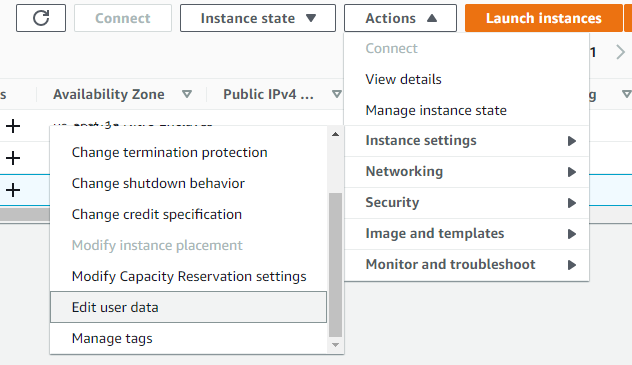
Paste a script such as this one, substituting the contents of your actual magic.pub:
Content-Type: multipart/mixed; boundary="=+"
MIME-Version: 1.0

--=+
Content-Type: text/cloud-config; charset="us-ascii"
MIME-Version: 1.0
Content-Transfer-Encoding: 7bit
Content-Disposition: attachment; filename="cloud-config.txt"

cloud_final_modules:
- [scripts-user, always]

--=+
Content-Type: text/x-shellscript; charset="us-ascii"
MIME-Version: 1.0
Content-Transfer-Encoding: 7bit
Content-Disposition: attachment; filename="replace-ssh-key.bash"

#!/bin/bash

cat > /home/ec2-user/.ssh/authorized_keys <<-EOF
ssh-rsa AAAAB3NzaC1yc2EAAAADAQABAAABgQC1pY+ct6N1DosG1qTSvbTVByY8CUilyn0ZVexISyBd+a4SPXbjgOKsRv4wiAYNHkMD29zFkvGXUgg8mB6UaOD7OeoI4opHpGNVYKGx4Sf+frvOzMuS7Z/VCrT+MtRc0GFI57K4aHNIVtJ6TxS1aq79eaD1ORG7TlgdqbBuR49KD1CemCZB/NdzPoo5D2oZTbr3yvrDXzRApzRX++DK3EZyNSrma8p1NUxB3H8JcNj7fmnDehrrAqoe9HctwJidc9/n/5c2AN3WV59SZLX4GhDRiKXIxOAq7pG0CWAUotlvRGhNRch87KzueLmQ/i5RsAKrx/B3dOAhlI6IF54HC8cdO6gjpjjfLxBCpireLHxNjNtBQCchMnHzGShGH3QEB1wHTZIa0ezN2kvjelC7hAB6UR/Klt6DD0lO4yBVGraahlUNFffLPHCf+Jym9Ppp2aXa0qzJIoRGFxpyC4KZDU1kzdWb3/Nou9qamyUbe4NBRLBc76L9sdD2Iz1SoolYm4E= brian@RWMZLB
EOF
--=+
start the ec2 instance
ssh using the new key
ssh -i magic ec2-user@your-host
Conclusion
Done!