Patching Copy Fail (CVE-2026-31431) on Red Hat Linux

by Brian Fitzgerald

Executive summary

Copy Fail (CVE-2026-31431) is a Linux kernel local privilege escalation that lets an unprivileged user become root with a single deterministic exploit. It is dangerous mainly in combination with remote vulnerabilities: any foothold that runs code as a non-root user — a compromised web service, a container — chains into root on the host. The fix is to install the patched kernel and reboot. Two things are easy to miss: instances launched from older AMIs, and instances restored from pre-patch snapshots, are vulnerable until they too are patched and rebooted. For hosts that can’t be patched immediately, blacklisting algif_aead via the kernel command line is an effective interim mitigation.

Introduction

Copy Fail (CVE-2026-31431) is a local privilege escalation (LPE) vulnerability in the Linux kernel’s algif_aead module, the AEAD interface of the kernel’s user-space crypto API (AF_ALG). It was disclosed publicly on April 29, 2026, and it affects essentially every mainline Linux kernel released since 2017 — across Ubuntu, RHEL, Amazon Linux, SUSE, Debian, and others. Its CVSS 3.1 score is 7.8 (High).

The bug is, on its own, only a local privilege elevation: the attacker must already have unprivileged host access. The danger is in what this vulnerability can be paired with. Any remote vulnerability becomes a path to root on the host. That combination — a remote foothold plus a reliable, deterministic LPE — is what makes Copy Fail a priority to address.

The fix is a kernel update. Three operational details are worth keeping in mind:

  1. Patched hosts must be rebooted. The fixed kernel does not take effect until it is the running kernel.
  2. Newly launched EC2 instances must be patched too, even if the AMI was current as of last week. Any AMI built before the fix landed in the vendor’s repos ships a vulnerable kernel.
  3. Instances restored from snapshots inherit the kernel of whatever was running when the snapshot was taken. A snapshot from before the patch is a vulnerable host, regardless of how recently it was restored.

This article walks through patching a single RHEL 10 EC2 instance on my personal AWS account and confirming, with a public proof-of-concept, that the patched kernel is no longer exploitable. It also revisits the questions and workarounds that came up in the days between disclosure and the kernel patch becoming available.

Demonstrate the bug

The instance is running RHEL 10.1 with the pre-patch kernel. Logged in as the unprivileged ec2-user, running the public proof-of-concept yields a root shell:

[ec2-user@ip-10-2-0-34 ~]$ python3.12 copy_fail_exp.py
[root@ip-10-2-0-34 ec2-user]# whoami
root
[root@ip-10-2-0-34 ec2-user]# id -u
0

No password prompt, no SSH key, no sudo — the exploit runs from a normal user shell and the next prompt is root. This is the deterministic behavior the vulnerability is known for: no race condition, no offsets, no retries.

The exploit script targets a setuid-root binary — /usr/bin/su — and on the unpatched kernel it tampers with that binary’s in-memory pages so that invoking it yields a root shell.

Day 0: can I just uninstall the affected piece?

On the day of disclosure, before any vendor guidance was out, the natural first question was whether the vulnerable subsystem could simply be removed — uninstall aead, uninstall authencesn, uninstall AF_ALG. The answer is no. There’s no algif-aead package, no af-alg package, no authencesn package. The vulnerable subsystem is part of the kernel image itself — built in on the affected distributions, not shipped as a separately installable or removable component. There is nothing to uninstall. The only way to change the code in question through the package manager is to replace the kernel, and on day 0 there was no fixed kernel to replace it with.

That left waiting for vendor guidance.

Day 1: blacklist algif_aead with grubby

The first official mitigation, ahead of the patched kernel, was to blacklist the algif_aead initcall on the kernel command line via grubby and restart:

[root@ip-10-2-0-34 ~]# grubby --update-kernel=ALL --args="initcall_blacklist=algif_aead_init"

After the restart, the AEAD interface of AF_ALG is never registered. The exploit script doesn’t get as far as the page-cache write that fails on the patched kernel — it fails earlier, at the system calls that set up the AF_ALG socket. With algif_aead blacklisted, bind() fails with FileNotFoundError. If AF_ALG is blacklisted entirely, socket() fails first, with EAFNOSUPPORT. Either way, the exploit doesn’t run.

Patch the kernel

The fix is delivered through the standard kernel package. On RHEL 10:

[root@ip-10-2-0-34 ~]# dnf update kernel

and so on …

Installing:
kernel x86_64 6.12.0-124.55.1.el10_1 rhel-10-baseos-rhui-rpms 1.4 M

… and so on

Installed:
kernel-6.12.0-124.55.1.el10_1.x86_64 kernel-core-6.12.0-124.55.1.el10_1.x86_64 kernel-modules-6.12.0-124.55.1.el10_1.x86_64 kernel-modules-core-6.12.0-124.55.1.el10_1.x86_64
Complete!

Restart the host

I restarted the EC2 instance from the AWS console. You can also issue reboot.

Demonstrate that the bug is patched

[root@ip-10-2-0-34 ~]# uname -r
6.12.0-124.55.1.el10_1.x86_64
[root@ip-10-2-0-34 ~]# exit
[ec2-user@ip-10-2-0-34 ~]$ python3.12 copy_fail_exp.py
Password:

On the patched kernel the tampering step does not happen, so /usr/bin/su runs normally and prompts for a password, which is exactly what an unprivileged user trying to become root should encounter.

Once the kernel is patched, the aead blacklist can be removed. Legitimate code can resume using the kernel’s user-space crypto interface.

What’s interesting about the chain

What stands out about Copy Fail is how unremarkable each step of the exploit is on its own. Reading a file as an unprivileged user is allowed. The kernel’s page cache is unified, so the pages a read brought in are the same pages a later execution would run from — that’s a feature, not a bug, and it’s what makes cache-warming tricks work. Opening a socket — including the user-space crypto sockets the AEAD interface provides — is allowed. Splicing data between file descriptors is allowed. None of these steps requires elevated privileges, and none of them looks suspicious in isolation. The exploit is a sequence of ordinary, sanctioned operations strung together so that a kernel weakness at one step lands a specially crafted change in a place that affects what the next setuid execution does. That’s what makes a local privilege elevation worth taking seriously even when the immediate prerequisite is “any unprivileged code execution on the host” — the building blocks are everywhere.

What this means going forward

Copy Fail is unlikely to be the last bug of this shape. About a week after Copy Fail was disclosed, a second LPE was disclosed under the name Dirty Frag (CVE-2026-43284 and CVE-2026-43500). Different kernel subsystems — xfrm-ESP and RxRPC — and different code paths, but the same underlying pattern: an in-place operation writing into page-cache pages that aren’t privately owned by the kernel.

The page cache is a large, well-trafficked piece of kernel infrastructure, and the in-place-optimization pattern that Copy Fail and Dirty Frag both exploit shows up in more than a few places. It would be surprising if the next several months didn’t bring more bugs in this family.

Two things about how these bugs are being found and disclosed are worth flagging. First, AI-assisted code analysis is now a real factor in kernel vulnerability discovery. Copy Fail was found that way — the researchers who disclosed it have said so explicitly — and the fact that the underlying weakness had been sitting in the kernel since 2017, through nine years of human review, suggests the new tooling is reaching code paths and combinations that didn’t get attention before. The same is likely true of Dirty Frag, where the older of the two bugs also dates to 2017. The economics of this kind of analysis are different from a human researcher’s: it scales, it doesn’t get bored, and it can re-examine entire subsystems whenever a new pattern is identified. The pace of discoveries should be expected to follow.

Second, the window between disclosure and a working public exploit is shrinking. Copy Fail had a working PoC out the day of disclosure. Dirty Frag was disclosed ahead of schedule because a third party broke the coordinated embargo, and a working PoC was public before any distribution had a patched kernel ready to ship. “Patch as soon as the vendor ships” is still the right answer, but it presupposes a vendor patch is available. When the disclosure outruns the patch, the question on the table is what the fleet does in the interim — which mitigation, applied through which mechanism, tracked how, removed when. That used to be an exceptional case; it is becoming an ordinary one.

The combination — more bugs, found faster, disclosed with less runway — argues for a fleet posture that can move quickly through several states. A known patching path for when patches exist. A known mitigation path for the gap before they do. A way to know, for any given host, which state it’s in. The specific bugs will change. The shape of the response is what’s worth investing in.

Conclusion

On its own, Copy Fail is a local privilege elevation — it requires the attacker to already have code execution on the host. In a cloud environment, that prerequisite is met by a wide range of common scenarios. Any remote bug in a public-facing service, any compromised CI runner, any malicious dependency that runs during a build, any container that can be coerced into executing attacker-supplied code, is enough of a foothold to chain into root on the host. The LPE is what turns a low-impact remote bug into a host compromise.

Patching the kernel and restarting the instance is the fix. Two operational notes worth keeping in mind:

  • New instances need to be patched, too. An AMI that was current last month is not current now. Any instance launched from a pre-patch image needs dnf update kernel (or the equivalent) and a restart before it should be considered safe.
  • Snapshots carry the kernel that was running when they were taken. Restoring a snapshot from before the fix produces a vulnerable host, even if the restore happened five minutes ago. The same patch-and-restart step applies.

Each host should land in one of two states: a patched kernel verified by uname -r, or the vulnerable code path made unreachable through a tracked mitigation such as the initcall_blacklist boot argument. Hosts in neither bucket are still exposed.

How to find which processes are using the most swap

by Brian Fitzgerald

Procedure

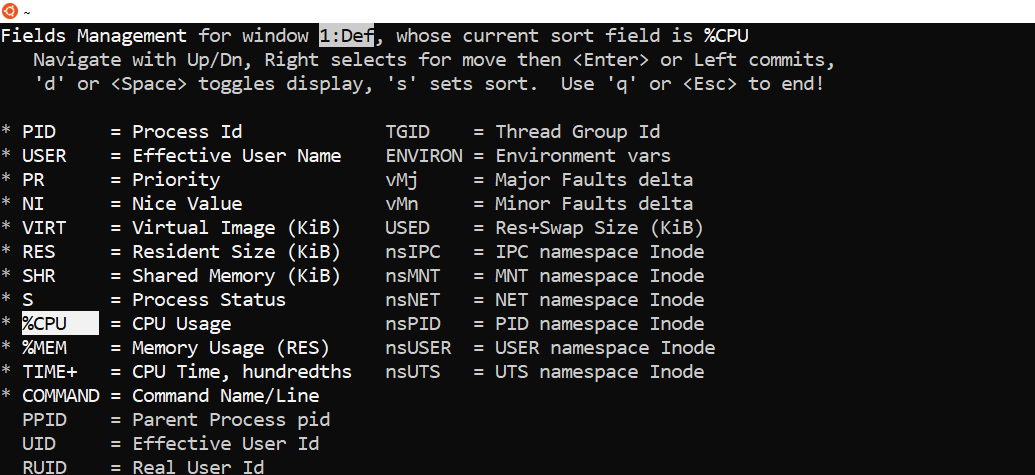
Start top

Press ‘f” (fields)

Press the down-arrow and stop at “SWAP”

This next step is for aesthetics only:

Press right-arrow to start moving the selection. Press up-arrow and stop between “%MEM” and “TIME+”. Press enter.

Press spacebar and note that “*” appears at left. Press “s” and note that “sort field is SWAP” appears at upper right.

Press “q”.

Voilà!

Elastic Block Store throughput testing with Orion

By Brian Fitzgerald

Introduction

ORacle I/O Numbers (Orion) results for EBS volumes are presented here. Multiple configurations of EC2 instance type, number of devices, IOPS configuration, and throughput configuration are tested. The objective is to identify the best performing and most economical system for use in Oracle Automatic Storage Management (ASM).

Amazon AWS EC2 EBS

AWS EC2 offers I/O capacity for a price. You get a slice of the underlying hardware’s full bandwidth depending on how much you pay. The actual throughput depends on the EC2 instance’s device controller and the underlying volume. EC2 device controller capacity depends on instance class (m5, r5b, etc.), and size (large, 4xlarge, etc.). EBS volume capacity depends on volume type (gp3, io2, etc.) and configuration (throughput and IOPS). Maximum I/O capacity will be the lesser of EC2 capacity and EBS volume capacity, provided that you get the layout right.

The I/O capabilities of the EBS volume types that were tested are summarized here:

Type gp3 gp2 st1 io2
Purpose General General Low cost High IOPs, low latency
Medium ssd ssd magnetic ssd
Configurable throughput Yes No No No
Maximum throughput configuration (Mbps) 1000
Configurable IOPS Yes Yes
Max IOPS configuration 160000 256,000

The EBS test volumes were not encrypted.

This article places emphasis on optimizing throughput, but some IOPS and latency observations are presented here as well. As a limiting case, we are interested in 100% write I/O throughput capacity.

I/O throughput rating on EC2

We are mainly concerned with the modern, Nitro EC2 m5, c5, r5, and r5b instance types. Throughput is defined as the rate, in Mbps for large (128 KiB) I/O, and could refer to a read, write, or mixed (read-write) workload.

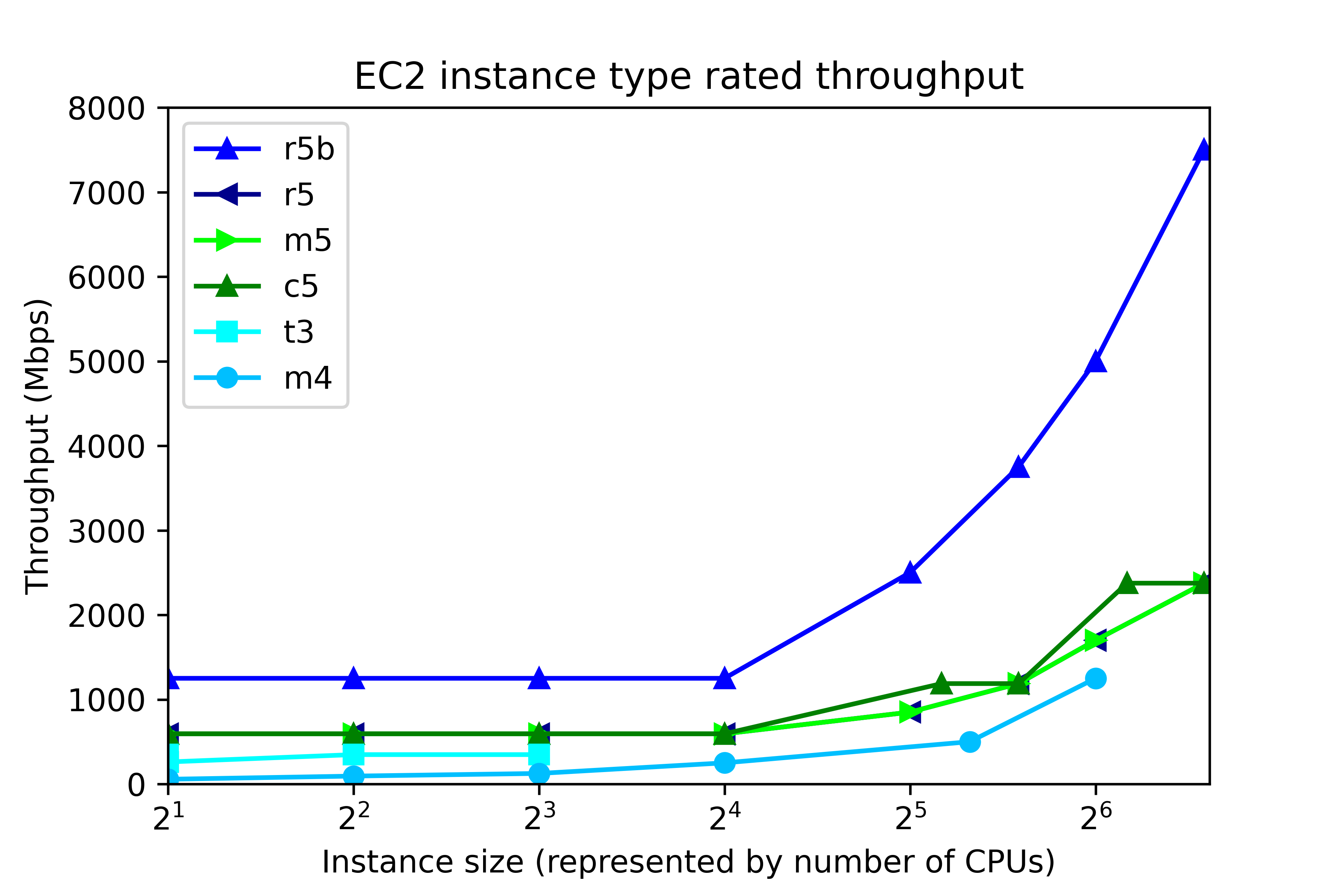
EC2 throughput rating can be found by running “aws ec2 describe-instance-types”, and is divided into two ranges, according to instance size, as shown in the following figure. The number of CPUs in EC2 maps to instance size thus:

Number of CPUs Instance size
2 large
4 xlarge
8 2xlarge
16 4xlarge
32 8xlarge
48 12xlarge
64 16xlarge
96 24xlarge

At the low end, up to 4xlarge, throughput is capped at a single value, regardless of instance size. That cap depends on instance class. In r5b, the cap is 1250 Mbps, but for c5, m5, and r5, throughput is capped at 593.75 Mbps. Other instance classes have lower throughput caps. At the high end, 8xlarge and up, throughput depends on the instance size. The r5b instance class tops out at 7500 Mbps. m5, c5, and r5 classes have throughput that ranges from 850 Mbps to 2375 Mbps, depending on instance type.

By now we have described the available volume types and instance types. So let’s pose this question. If we configure 8 gp3 volumes at 1000 Mbps each, then the system should deliver 8000 Mbps throughput, right?

Wrong.

No EC2-EBS-Linux system today delivers 8000 Mbps throughput. You will get, at best, the throughput offered by the EC2 instance type. For example, if you build an m5.4xlarge instance, then the highest possible throughput will be 593.75 Mbps, as I mentioned. Also, 593.75 Mbps is the most you will get. Actually achieving that requires configuring multiple volumes.

Operating system description

The test system is an Amazon AWS EC2 instance running Red Hat Linux 7.9. The test software is orion, which is found in the Oracle home. The number of CPUs, the amount of memory, and the device controller interface depend on the EC2 instance type. For example, the m5.xlarge has 4 CPUs, 16 GB RAM, and a non-volatile memory express (NVMe) device controller interface.

Test description

100% write I/O was tested with orion. General purpose volumes (gp2 and gp3), and the lower cost st1 storage were tested with large writes. I/O optimized storage (io2) was tested at small I/O. Each test ran from 4 to 20 minutes, depending on the number of volumes. For the throughput tests, “Maximum Large MBPS” was extracted from the summary.txt file. In the small I/O tests, “Maximum Small IOPS” and “Minimum Small Latency” were extracted.

Instance type and volume type

In this section, the influence of instance type and volume type in investigated. The new I/O-optimized r5b instance type was tested with gp3 storage. General purpose m5 instance class was tested with gp2, gp3, and io2 storage. Additionally, the lower cost, burstable t3 instance class, and the previous generation m4 instance class were tested. The number of CPUs ranged from 2 to 96. As a rule of thumb, the amount of memory for the m5, t3, and m4 instance classes, in GB, is four times the number of CPU. Eight 125-GB volumes were tested in every run. In all, there were 31 test runs.

Throughput testing

General  purpose storage was tested for throughput. gp3 storage was configured for 1000 Mbps throughput per volume (the maximum) and 4000 IOPS The results are displayed here.Each point represents the maximum throughput obtained in a single test. The dark blue line, for example, displays Orion throughput results for 6 tests on r5b.large, r5b.4xlarge, r5b.8xlarge, r5b.12xlarge, r5b.16xlarge, r5b.24xlarge, The test points above 24 are results of separate tests on r5b.4xlarge, m5.4xlarge on gp3 volume type, m5.4xlarge on gp2 volume type, t3.4xlarge, m4.4xlarge, and m5.4xlarge on st1 volume type. Again, each point is a separate test, not Orion data points from a single test.

The figure shows actual system throughput for 8 volumes. We already said that just because you configure 8 1000 Mbps volumes does not mean that the observed throughput will be 8000 Mbps. Instead, the throughput is limited by the instance type.

The key points to notice in the throughput testing are:

  • The observed throughput is level across instance types up to 4xlarge (24 CPUs), just like the documentation says.
  • Starting at 8xlarge, (25 CPUs), gp3 throughput scales up with the instance size, reaching 7330 Mbps on the r5b.24xlarge instance type, and 2330 Mbps on m5.24xlarge, again, just like the documentation says.
  • Like gp3 on the m5, gp2 throughput is level at 580 Mbps for instances up to 4xlarge.
  • From 12xlarge and up, gp2 throughput is level at 1015 MPBs.
  • For t3.xlarge and up, throughput plateaus at 335 Mbps.
  • In older instance class m4, throughput ranges from 55 Mbps to 240 Mbps.

Notice that in high-end instance types, r5b throughput is better than 3x the m5 throughput. This is one example where actual observations match the marketing materials: New – Amazon EC2 R5b Instances Provide 3x Higher EBS Performance

By using the number of CPUs on the horizontal axis, we do not mean to imply that CPUs have a significant influence on system throughput in EC2. In fact, during ORION testing, CPU workload tends be low, and the same can be said for memory footprint. Plotting vs “Number of CPUs” is just meant to be a convenient method for having plotting I/O numbers vs instance size. AWS throttles throughput depending on instance type and size, separately from the number of CPUs.

IOPS testing

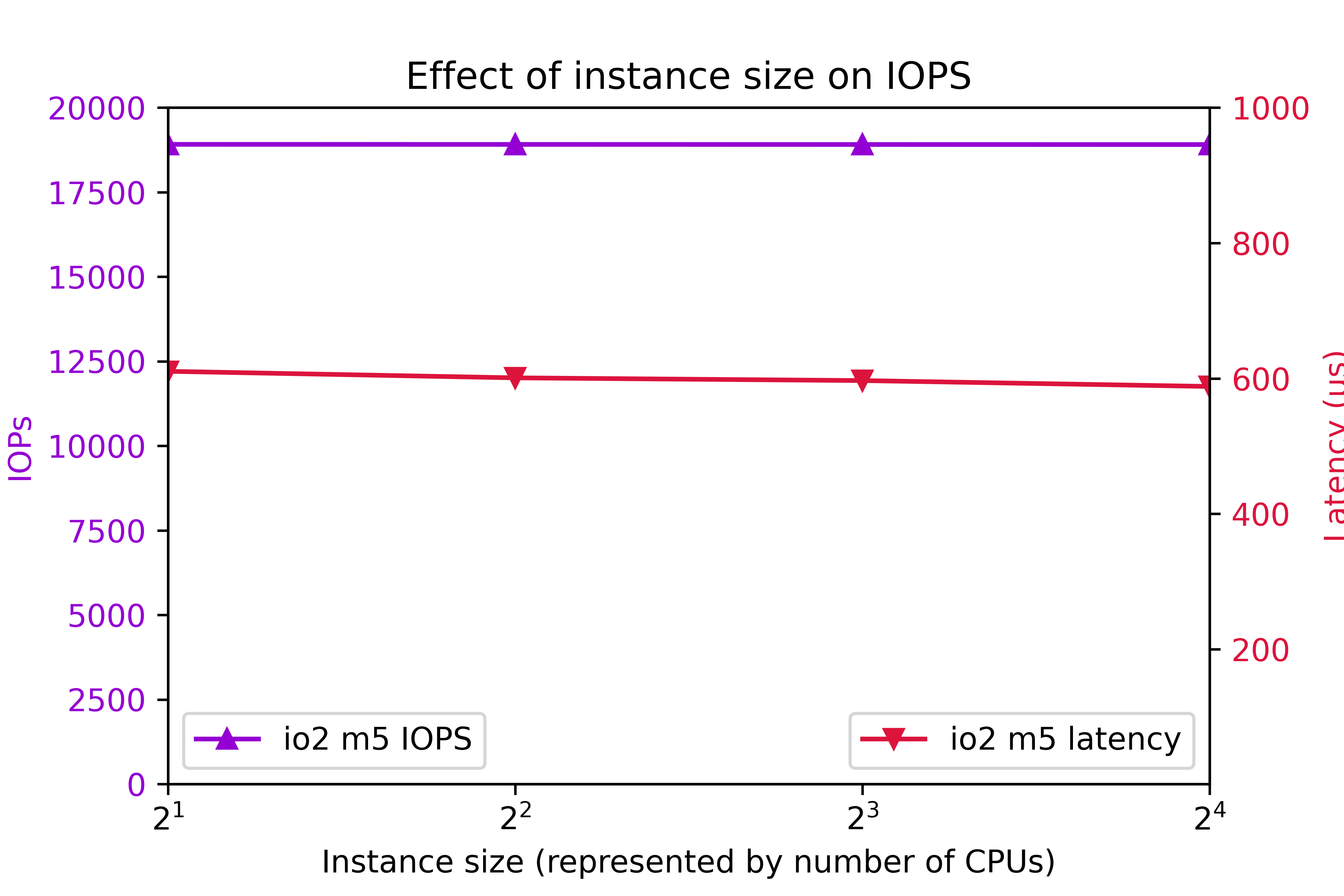
I/O Optimized storage io2 configured for 7000 IOPS per volume on the m5 class was also tested. 8 volumes were tested.Again, to clarify, configured IOPS for each volume was 7000. You might think that configuring 8 volumes are 7000 IOPS per volume should deliver 56000 IOPS. As you can see, actual IOPS is less.

The key IOPS testing observations are:

  • IOPs is flat at 18905.
  • Latency is flat at 600ms.

Conclusion

  • r5b throughput outperforms m5 by better than 3x.
  • I/O performance is level up to 4xlarge.
  • Starting at 8xlarge, throughput ramps up with instance class.
  • 24xlarge delivers the highest throughput.
  • t3 write throughput lags m5, and m4 write throughput lags t3.
  • The observed system I/O rate is much less than you would expect if you calculated I/O rate based on the volume configuration.

This section was an overview of the capabilities of various EC2 instance types and volume types with eight volumes. As we are about to see, tuning the number of volumes is crucial to optimizing instance performance.

Number of volumes

The influence of the number of volumes on I/O was tested for various instance types. The number of volumes ranged from 1 to 16. Throughput was tested on general purpose volume types gp2 and gp3. The gp3 storage was configured for 1000 Mbps and 4000 IOPs per volume. The results are shown in the following figure:Additionally, IOPS was measured on on I/O optimized volume type io2. IOPS was set at 7000 per volume. The results are shows here:The key findings are

  • For improved throughput, I/O should be distributed across multiple volumes.
  • In r5b.24xlarge, throughput increases all the way out to 7300 Mbps at 16 volumes.
  • In r5b8xlarge and m5.24xlarge, throughput levels off around 2400 Mbps at 8 volumes.
  • On m5.large, gp2 and gp3 throughput levels off at 580 Mbps at four volumes.
  • On m5.large, io2 IOPs plateaus at 18905 IOPs at four volumes.
  • io2 latency tends to remain below 625ms.

Be aware that the EC2 device attachment limit is 28, including the network adapter and up to 27 volumes, including the system disk. A practical Oracle ASM system could consist of two diskgroups and four or more disks per group.

In conclusion, one can expect improve I/O by implementing four volumes. In high end systems, configuring eight or more volumes is beneficial. Exercise prudence on the number of volumes, because throughput and IOPS charges are per-volume.

Configured volume throughput

So far, we have tested volumes that are over-provisioned, meaning that measured throughput turned out to be much less than rated throughput. You don’t get what you pay for. So how much throughput should you actually be configuring?

In this section, we investigate the effect of configured throughput versus actual throughput on gp3 volumes. gp3 volumes were configured at 3000 IOPs and a throughput range from 125 Mbps to 1000 Mbps. Various m5 and r5b instance types were tested. The results are shown here.In the m5.large, m5.24xlarge, and r5b.8xlarge cases, setting volume throughput to 375 Mbps achieves the maximum possible system throughput. Setting volume throughput higher than that leads to no further gains in performance. In r5b.12xlarge and r5b.24xlarge, performance can be maximized by setting throughput to 500 Mbps. In conclusion, although gp3 throughput can be adjusted to 1000 Mbps, there is no benefit to setting gp3 throughput above 500 Mbps, and only in rare cases is it beneficial to set gp3 throughput above 375 Mbps.

Intel vs. AMD

AWS offers a choice of Intel or AMD processor on Red Hat EC2. AMD EC2 prices are 10% lower than Intel. Rated EBS throughput on the AMD systems is less than on Intel.

AMD
Intel
instance type throughput (Mbps) instance type throughput (Mbps)
t3a.medium t3.medium
m5a.large 2880 m5.large 4750
m5a.24xlarge 13570 m5.24xlarge 19000

The test system configurations were:

Instance type CPUs Volumes Storage Throughput IOPS
t3[a].medium 2 4 st1
m5[a].large 2 8 gp3 375 3000
m5[a].24xlarge 96 8 gp3 375 3000

“t3[a].medium” refers to a comparison of a t3a.medium (AMD) system to a t3.medium (Intel) system, and so on, for m5[a].large and m5[a].24xlarge.At the low end instance types, AMD and Intel performed equally. At the high end, Intel edged AMD.

Systems for different purposes

Recommendations for three different type of systems are presented here. The target system is Oracle Database on top of Grid Infrastructure on Red Hat. Only systems with at least 2 CPUs and 4 GB RAM are considered. A “system” could refer to an ASM diskgroup, such as DATA, RECO, or REDO.

Low cost

You might need a low cost system for light development, well-tuned reports, archiving, etc. Use the t3a instance class and st1 storage.

General purpose

For general purpose production systems, use the m5 class. If you want to halve the memory, substitute c5 and save 9% to 11%. To double the system memory, use r5 and pay 24% to 30% more. Configure four or more gp3 volumes per ASM diskgroup at 125 Mbps to 375 Mbps throughput and 3000 IOPS.

High throughput

For highest large write throughput on EBS, use r5b.24xlarge, and at 16 gp3 volumes configured at 500 Mbps.

Example systems and cost

Example of the three types of system are presented in this table. This time, we present CPU and storage cost, assuming Red Hat Linux and on demand pricing in region us-east-1, as of 7/24/2021.

Purpose Instance Type Vol type Num CPU Vol Size Num Vols Thr IOPS Actual Mbps EC2 EBS Total
Low cost t3a.medium st1 2 125 8 245 $71 $45 $116
General purpose m5.large gp3 2 250 4 125 3000 497 $114 $80 $194
High throughput r5b.24xlarge gp3 96 1000 16 500 3000 7330 $5316 $1522 $6838

Do not waste money

Follow this guidance to avoid wasting money

  • Avoid io2 EBS for general purpose Oracle databases. The cost is prohibitive.
  • In gp3, configure throughput at 500 Mbps or less, and configure 3000 IOPS.
  • For good, economical performance, configure gp3 at 125 Mbps and 3000 IOPS.

Workload

This article offers guidance on configuring the AWS EBS at 100% write. The findings apply to any diskgroup, particularly to redo diskgroups and to databases with high throughput requirements, such as ETL systems. The information is among many factors to consider when specifying a practical database system. Orion is also capable of simulating a 100% read workload, and a mixed workload. Mixed workload Orion results could be used to look for further cost reductions. Actual database application performance depends not only on storage throughput, but also on processor design, amount and speed of memory, and table design.

ASM diskgroup layout

Oracle makes ASM diskgroup layout recommendations: RAC and Oracle Clusterware Best Practices and Starter Kit (Platform Independent) (Doc ID 810394.1).

Oracle recommends a minimum 4 disks per diskgroup:My own test results show that a minimum of 4 LUNs per diskgroup lead to optimal throughput. Configuring 4 or more LUNs per diskgroup is extremely important.

Oracle recommends no more than 2 ASM diskgroups:Benefits of no more than 2 ASM diskgroups:

  • Simplified administration.
  • High throughput in all diskgroups.
  • Avoid approaching the EC2 attachment limit.

If you configure more than 2 diskgroups, you could find yourself making design compromises at exactly the wrong places. For example, online redo logs are critical, high throughput components. If you configure separate REDO diskgroups in EC2, then you may find it difficult to keep to 4 disks per diskgroup, and still allow for expansion and remain within the attachment limit. Or you may find that so many diskgroups leads to a manageability issue.

Conclusion

The r5b instance class with gp3 storage delivers the highest performing I/O. m5, c5, and r5 instance classes make well-performing, general purpose systems with high throughput. The t3a instance class with st1 storage makes a fair-performing, low cost system. Each ASM disk groups should be configured with a minimum of 4 disks and more than 4 disks for high throughput r5b systems. For optimal throughput, gp3 EBS should be configured at 3000 IOPS and no more than 500 Mbps.

replace ec2 ssh key

By Brian Fitzgerald

Introduction

The employee with the ec2-user secret ssh key left the company.

Now what?

Procedure

identify a key

Use an exiting ssh key pair or create a new one with a command such as:

ssh-keygen -m -f magic

Files magic and magic.pub get created as a result, in this example.

stop the ec2 instance

edit the user data

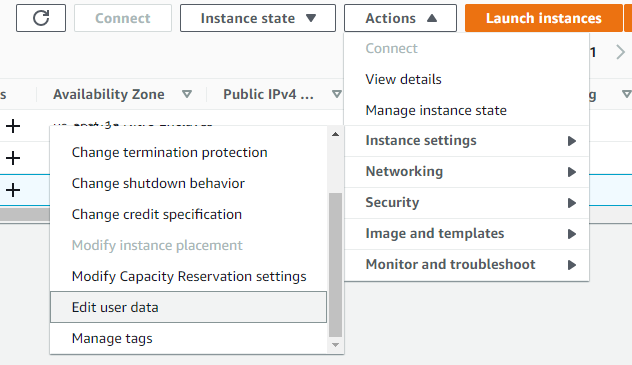
Select your ec2 instance. Select actions->Edit user data.

Paste a script such as this one, substituting the contents of your actual magic.pub:

Content-Type: multipart/mixed; boundary="=+"
MIME-Version: 1.0

--=+
Content-Type: text/cloud-config; charset="us-ascii"
MIME-Version: 1.0
Content-Transfer-Encoding: 7bit
Content-Disposition: attachment; filename="cloud-config.txt"

cloud_final_modules:
- [scripts-user, always]

--=+
Content-Type: text/x-shellscript; charset="us-ascii"
MIME-Version: 1.0
Content-Transfer-Encoding: 7bit
Content-Disposition: attachment; filename="replace-ssh-key.bash"

#!/bin/bash

cat > /home/ec2-user/.ssh/authorized_keys <<-EOF
ssh-rsa AAAAB3NzaC1yc2EAAAADAQABAAABgQC1pY+ct6N1DosG1qTSvbTVByY8CUilyn0ZVexISyBd+a4SPXbjgOKsRv4wiAYNHkMD29zFkvGXUgg8mB6UaOD7OeoI4opHpGNVYKGx4Sf+frvOzMuS7Z/VCrT+MtRc0GFI57K4aHNIVtJ6TxS1aq79eaD1ORG7TlgdqbBuR49KD1CemCZB/NdzPoo5D2oZTbr3yvrDXzRApzRX++DK3EZyNSrma8p1NUxB3H8JcNj7fmnDehrrAqoe9HctwJidc9/n/5c2AN3WV59SZLX4GhDRiKXIxOAq7pG0CWAUotlvRGhNRch87KzueLmQ/i5RsAKrx/B3dOAhlI6IF54HC8cdO6gjpjjfLxBCpireLHxNjNtBQCchMnHzGShGH3QEB1wHTZIa0ezN2kvjelC7hAB6UR/Klt6DD0lO4yBVGraahlUNFffLPHCf+Jym9Ppp2aXa0qzJIoRGFxpyC4KZDU1kzdWb3/Nou9qamyUbe4NBRLBc76L9sdD2Iz1SoolYm4E= brian@RWMZLB
EOF
--=+

start the ec2 instance

ssh using the new key

ssh -i magic ec2-user@your-host

Conclusion

Done!

curl on el5 with TLS 1.2

By Brian Fitzgerald

Background

We needed a curl that supportsTLS 1.2 to be working on Red Hat el5 in order to migrate off el5. The default curl does not support TLS 1.2
Solution: download and compile curl on el5

Test case

Download Oracle patch p6880880_200000_Linux-x86-64.zip from MOS.
Steps:
Store the URL, the file name, and your cookies in files url.txt, filename.txt , and cook.txt, respectively. For instructions on getting your browser cookies, please refer to Oracle binaries or patch download from Linux command line.

Symptom

$ uname -r
2.6.18-426.el5
$ which curl
/usr/bin/curl
$ curl -b cook.txt  -o "` cat filename.txt `" -L "` cat url.txt `"
curl: (35) error:14077410:SSL routines:SSL23_GET_SERVER_HELLO:sslv3 alert handshake failure

Prerequisites to compiling curl

perl 

Install Perl v5.10.0 minimum
unset LD_LIBRARY_PATH
cd /u02/sw/perl/src/perl-5.30.2
./Configure -de -Dprefix=/u02/sw
make
make install

openssl

cd /u02/sw/openssl/src/openssl-1.1.1g
export PATH=/u02/sw/bin:/bin:/usr/bin
./config --prefix=/u02/sw enable-egd  
make
make install

openldap

cd /u02/sw/openldap/src/openldap-2.4.56
export PATH=/bin:/usr/bin
export LD_FLAGS=-L/u02/sw/lib
export CPPFLAGS=-I/u02/sw/include
./configure --prefix=/u02/sw --with-ssl=/u02/sw
make
make install

sasl

cd /u02/sw/cyrus-sasl/src/cyrus-sasl-2.1.27
./configure --prefix=/u02/sw --with-openssl=/u02/sw/ssl
make
make install
ln -s libsasl2.so /u02/sw/lib/libsasl2.so.2

Compile curl

cd /u02/sw/curl/src/curl-7.73.0
./configure --prefix=/u02/sw --with-ssl=/u02/sw
make
make install
unset LD_FLAGS

Tests

el5

$ ./test.u02.curl.bash
2.6.18-426.el5
  % Total    % Received % Xferd  Average Speed   Time    Time     Time  Current
                                 Dload  Upload   Total   Spent    Left  Speed
  0     0    0     0    0     0      0      0 --:--:-- --:--:-- --:--:--     0
100  116M  100  116M    0     0  9357k      0  0:00:12  0:00:12 --:--:-- 17.3M

el6

$ ./test.u02.curl.bash
2.6.32-754.31.1.el6.x86_64
  % Total    % Received % Xferd  Average Speed   Time    Time     Time  Current
                                 Dload  Upload   Total   Spent    Left  Speed
  0     0    0     0    0     0      0      0 --:--:-- --:--:-- --:--:--     0
100  116M  100  116M    0     0  4132k      0  0:00:28  0:00:28 --:--:-- 4184k

el7

$ ./test.u02.curl.bash
3.10.0-1062.el7.x86_64
  % Total    % Received % Xferd  Average Speed   Time    Time     Time  Current
                                 Dload  Upload   Total   Spent    Left  Speed
  0     0    0     0    0     0      0      0 --:--:-- --:--:-- --:--:--     0
100  116M  100  116M    0     0  42.3M      0  0:00:02  0:00:02 --:--:-- 51.8M

Actual TLS version

Verbose output shows:
$ curl -v -b cook.txt -o “` cat filename.txt `” -L “` cat url.txt `”
 . .
* SSL connection using TLSv1.3 / TLS_AES_256_GCM_SHA384
* ALPN, server accepted to use http/1.1

Conclusion

A locally-compiled curl runs on Red Hat el5, el6, el7

EC2 maximum number of volumes

Introduction

The documented AWS EC2 EBS volume attachment limit is 27. The attachment limit affects the maximum number of Oracle ASM disks.

EC2 volume limit

Amazon AWS documents a 27-volume attachment limit. I have found that a t2 type creation attempt with 28 EBS volumes will abort.

error.png

Attempting to create an m5 (Nitro)  with 28 or more volumes will hang.

creating

The attachment limit is 28, including network interfaces, volumes, and instance store volumes. EC2 instances with one network interface can have up to 27 volumes attached.

EC2 instances with more than 27 volumes

I am aware of t2 EC2 systems with as many as 44 volumes attached. I have no information about how this was done, and what the customer’s support expectations are. I would be concerned about how such a system would respond to a change of instance type.

Oracle Database

In planning an Oracle database installation, you may need file system mounts as well. /u01, for example. The underlying volume counts against the maximum attachment count.

In laying out an ASM setup, consider a simple design, with as few ASM disks and ASM disk groups as needed.

Conclusion

Based on the available public information, I recommend limiting the number of EBS volume attachments to 27. Oracle database administrators might want to simplify their ASM implementation.

Unexpected behavior in Data Guard Maximum Protection

By Brian Fitzgerald

Introduction

Maximum Protection mode provides the highest level of data protection in Data Guard. Although a Maximum Protection system protects data as documented, there are performance issues that database administrators should be aware. The most glaring weakness is that in case of a network timeout anywhere in the system, the primary database hangs.  Administrators should be aware of this before deciding on Maximum Protection mode.

Protection Modes

To quote the manual, Oracle Data Guard ensures high availability, data protection, and disaster recovery for enterprise data. Oracle Data Guard provides three distinct modes of data protection.

Maximum Performance

This is the default protection mode. It provides the highest level of data protection that is possible without affecting the performance of a primary database. 

Maximum Availability

This protection mode provides the highest level of data protection that is possible without compromising the availability of a primary database. 

Maximum Protection

This protection mode ensures that no data loss occurs if the primary database fails. To provide this level of protection, the redo data needed to recover a transaction must be written to both the online redo log and to the standby redo log on at least one synchronized standby database before the transaction commits. To ensure that data loss cannot occur, the primary database shuts down, rather than continue processing transactions, if it cannot write its redo stream to at least one synchronized standby database.

This article is about Maximum Protection mode. Based on the description, there are a few obvious points to be deduced about Maximum protection. A practical system must have more than one standby. Otherwise, failure of the sole standby will cause the system to crash. Secondly, a low latency network is required to achieve reasonable commit performance. Finally, completely redundant hosts and storage are required for each standby. In the past, with physical hardware and long administrative lead times, it was prohibitive to experiment with Maximum Protection. In the cloud, however, virtual machines are inexpensive and setup is quick.

License

Data Guard is a feature of the Oracle Database Enterprise Edition itself and does not require separate licensing. By using Amazon Elastic Cloud Computing, (EC2), you can control your license costs by configuring only the CPUs that you need.

Overview

The demonstration system characteristics are:

  • Amazon AWS
  • Region us-west-1 (Northern California)
  • Availability zones us-west-1b and us-west-1c
  • Elastic Compute Cloud (EC2)
  • Red Hat Linux 7.2
  • Oracle Grid Infrastructure 19c
  • Oracle Database 19c

AWS availability zones are separate locations within the same geographic region. In us-wet-1, intra-availability-zone TCP latency, as measured by qperf,  is 136μs, which is attractive for setting up Oracle Data Guard Maximum Protection. Inter-availability-zone TCP latency is 562μs. Note that availability zones identifiers are mapped independently for each account. For example, availability zone us-west-1b could refer to different locations for different accounts. Here is the mapping from database to availability zone that was used in this test.

db unique name availability zone
SFB1 us-west-1b
SFB2 us-west-1b
SFC1 us-west-1c
SFC2 us-west-1c

Setup

Here is a brief summary of  the preparatory steps:

  • environment:
    • create and configure virtual machine
    • install grid infrastructure
    • create ASM disk groups
    • install oracle database software
    • setup static listener
  • duplicate database
    • setup tnsnames.ora
    • create orapwd
    • create temporary init ora
    • startup nomount
    • duplicate target database for standby
  • setup Oracle Restart
  • validate all static listeners
  • start Data Guard broker

Create configuration

DGMGRL> create configuration 'CFG' primary database is 'SFB1' connect identifier is 'SFB1';
Configuration "CFG" created with primary database "SFB1"
DGMGRL> add database 'SFB2' as connect identifier is 'SFB2';
Database "SFB2" added
DGMGRL> add database 'SFC1' as connect identifier is 'SFC1';
Database "SFC1" added
DGMGRL> add database 'SFC2' as connect identifier is 'SFC2';
Database "SFC2" added

Set log transfer property to SYNC. Set Maximum Availability

DGMGRL> edit database SFB2 set property LogXptMode=SYNC;
Property "logxptmode" updated
DGMGRL> edit database SFC1 set property LogXptMode=SYNC;
Property "logxptmode" updated
DGMGRL> edit database SFC2 set property LogXptMode=SYNC;
Property "logxptmode" updated
DGMGRL> edit configuration set protection mode as MaxAvailability;
Succeeded.

Test switchovers. Primary SFB1->SFB2->SFC1->SFC2->SFB1.

DGMGRL> switchover to SFB2
Performing switchover NOW, please wait...
Operation requires a connection to database "SFB2"
Connecting ...
Connected to "SFB2"
Connected as SYSDBA.
New primary database "SFB2" is opening...
Oracle Clusterware is restarting database "SFB1" ...
Connected to "SFB1"
Connected to an idle instance.
Connected to "SFB1"
Connected to "SFB1"
Switchover succeeded, new primary is "sfb2"
DGMGRL> switchover to SFC1
Performing switchover NOW, please wait...
Operation requires a connection to database "SFC1"
Connecting ...
Connected to "SFC1"
Connected as SYSDBA.
New primary database "SFC1" is opening...
Oracle Clusterware is restarting database "SFB2" ...
Connected to "SFB2"
Connected to an idle instance.
Connected to "SFB2"
Connected to "SFB2"
Switchover succeeded, new primary is "sfc1"
DGMGRL> switchover to SFC2
Performing switchover NOW, please wait...
Operation requires a connection to database "SFC2"
Connecting ...
Connected to "SFC2"
Connected as SYSDBA.
New primary database "SFC2" is opening...
Oracle Clusterware is restarting database "SFC1" ...
Connected to "SFC1"
Connected to an idle instance.
Connected to "SFC1"
Connected to "SFC1"
Switchover succeeded, new primary is "sfc2"
DGMGRL> switchover to SFB1
Performing switchover NOW, please wait...
Operation requires a connection to database "SFB1"
Connecting ...
Connected to "SFB1"
Connected as SYSDBA.
New primary database "SFB1" is opening...
Oracle Clusterware is restarting database "SFC2" ...
Connected to "SFC2"
Connected to an idle instance.
Connected to "SFC2"
Connected to "SFC2"
Switchover succeeded, new primary is "sfb1"

Now we are ready to implement Maximum Protection mode

Set Maximum Protection

DGMGRL> edit configuration set protection mode as MaxProtection; 
Succeeded.

Test switchovers again. There is no issue

DGMGRL> switchover to SFC2
Performing switchover NOW, please wait...
Operation requires a connection to database "SFC2"
Connecting ...
Connected to "SFC2"
Connected as SYSDBA.
New primary database "SFC2" is opening...
Oracle Clusterware is restarting database "SFB1" ...
Connected to "SFB1"
Connected to an idle instance.
Connected to "SFB1"
Connected to "SFB1"
Switchover succeeded, new primary is "sfc2"

Network failures

Failure of some, but not all standbys

Here, where you are testing actual network failures, is where you are going to notice serious issues with Maximum Protection mode.

The initial status is normal. All standbys are in sync with the primary.

DGMGRL> show configuration

Configuration - CFG

  Protection Mode: MaxProtection
  Members:
  SFB1 - Primary database
    SFB2 - Physical standby database
    SFC1 - Physical standby database
    SFC2 - Physical standby database

Fast-Start Failover:  Disabled

Configuration Status:
SUCCESS   (status updated 21 seconds ago)

Now we want to cause a network failure to one standby, SFC2, for example. We stage the failure by cutting TCP port 1521. In the AWS console, create a new security group that allows ingress to TCP port 22 only.

cutoff.sg

Go to change security groups. Un-check the original security group, check the “ssh only” security group, and press “Assign Security Groups”. There are three standbys, but we are cutting off network access to only one standby. The system should continue to operate normally. However, right away, you can notice a problem. Try to commit a transaction.

SQL> insert into t ( n ) values ( 0 );

1 row created.

SQL> commit;

You will find that the transaction does not complete. You can run “show configuration”. For 30 seconds, the configuration shows up as normal. No messages appear in the alert log. All the while, only one standby is unreachable. Two other standbys are reachable, but the database hangs. Eventually, Oracle notices the issue. Messages start appearing in the alert log.

2019-09-13T12:43:51.076718-04:00
LGWR (PID:26748): ORA-16198: Received timed out error from KSR
LGWR (PID:26748): Attempting LAD:4 network reconnect (16198)
LGWR (PID:26748): LAD:4 network reconnect abandoned

The transaction commits. The configuration now appears as:

DGMGRL> show configuration

Configuration - CFG

  Protection Mode: MaxProtection
  Members:
  SFB1 - Primary database
    SFB2 - Physical standby database
    SFC1 - Physical standby database
    SFC2 - Physical standby database
      Warning: ORA-16857: member disconnected from redo source for longer than specified threshold

Fast-Start Failover:  Disabled

Configuration Status:
WARNING   (status updated 8 seconds ago)

You can repeat the process for a second standby, SFC1, for example. Again, the database hangs for 30 seconds, and finally resolves.

DGMGRL> show configuration

Configuration - CFG

  Protection Mode: MaxProtection
  Members:
  SFB1 - Primary database
    Error: ORA-16778: redo transport error for one or more members

    SFB2 - Physical standby database
    SFC1 - Physical standby database
      Warning: ORA-16857: member disconnected from redo source for longer than specified threshold

    SFC2 - Physical standby database
      Warning: ORA-16857: member disconnected from redo source for longer than specified threshold

Fast-Start Failover:  Disabled

Configuration Status:
ERROR   (status updated 160 seconds ago)

This section, where failure of some, but not all standbys leads to an application hang is going to be objectionable to some application users.

Failure of all standbys

Now disconnect the third standby.  Observe this behavior:

  • The primary will retry the standbys for 5 minutes.
  • Sessions that issue a commit will wait.
  • The primary will abort and restart.
  • During restart, the instance will hang on open database.
  • After 8 more minutes, the primary will abort.

Host shutdown is the expected behavior after a failure of all standbys. The following message will appear in SQL*Plus sessions that were waiting on commit.

commit
*
ERROR at line 1:
ORA-03113: end-of-file on communication channel
Process ID: 10524
Session ID: 39 Serial number: 7415

Some may find it surprising that the shutdown is not instantaneous, and that it takes five minutes before the database shuts down.

Adjusting NetTimeout

You can reduce the amount of time that an application can wait on TCP timeout:

DGMGRL> edit database SFB1 set property NetTimeout = 5;
Property "nettimeout" updated
DGMGRL> edit database SFB2 set property NetTimeout = 5;
Property "nettimeout" updated
DGMGRL> edit database SFC1 set property NetTimeout = 5;
Property "nettimeout" updated
DGMGRL> edit database SFC2 set property NetTimeout = 5;
Property "nettimeout" updated

This is a workaround and is beside the point. The application still has to wait to commit even though one or more standbys is still available. There should be no hanging.

Conclusion

There is a flaw in Data Guard Maximum Protection. If a TCP timeout error involving only one standby, the primary will hang even if other standbys are available. This issue will lead some administrators to rule out Data Guard Maximum Protection.

In the past, because of high hardware costs, long lead times, and separation of duties across DBA and SAs, it was rare to test Maximum Protection. Now, with the cloud, testing such arrangements is convenient, but testing uncovers weakness in the design.

Likewise, in the past, because of separation of duties across DBAs and network administrators, it was rare for DBAs to stage TCP timeout tests, but such tests are simple to perform now. TCP timeout tests uncover weaknesses in Data Guard.

Data Guard Maximum Availability has improved over time to the point where it is an acceptable substitute for Maximum Performance in some cases.

Oracle 12.1 introduced the far sync instance, which can be configured near a primary database on a low latency network to provide near-zero-data loss capability. Maximum Availability and far sync are described in this article. An Active Data Guard license is required for far sync. Ironically, in this sense, Maximum Availability costs more than Maximum Protection, the highest level.

DGMGRL not required in listener.ora in Restart

By Brian Fitzgerald

Introduction

In Oracle Restart, _DGMGRL services are no longer required in listener.ora. Switchover output has changed slightly and _DGMGRL connections no longer appear in the listener log.

Background

While testing switchover in Data Guard in 19c, I noticed that after configuring Restart, connections to _DGMGRL longer appeared in the listener log. I deleted the _DGMGRL services, reloaded the listeners, and retested the switchover without issue.

Static listeners (initial)

Initially, in the grid account, in $ORACLE_HOME/network/admin/listener.ora, these SID_LIST_LISTENER were in place. At the primary:

SID_LIST_LISTENER =
  (SID_LIST =
    (SID_DESC =
      (GLOBAL_DBNAME = NY_DGMGRL)
      (ORACLE_HOME = /u01/app/oracle/product/19.3.0/dbhome_1)
      (SID_NAME = ORCL)
    )
  )

At the far sync:

SID_LIST_LISTENER =
  (SID_LIST =
    (SID_DESC =
      (GLOBAL_DBNAME = FS_DGMGRL)
      (ORACLE_HOME = /u01/app/oracle/product/19.3.0/dbhome_1)
      (SID_NAME = ORCL)
    )
  )

At the standby:

SID_LIST_LISTENER =
  (SID_LIST =
    (SID_DESC =
      (GLOBAL_DBNAME = SF_DGMGRL)
      (ORACLE_HOME = /u01/app/oracle/product/19.3.0/dbhome_1)
      (SID_NAME = ORCL)
    )
  )

I reloaded the listeners at each host:

[grid@ip-172-31-86-22 ~]$ lsnrctl reload

LSNRCTL for Linux: Version 19.0.0.0.0 - Production on 02-SEP-2019 12:28:09

Copyright (c) 1991, 2019, Oracle. All rights reserved.

Connecting to (DESCRIPTION=(ADDRESS=(PROTOCOL=TCP)(HOST=ip-172-31-86-22.ec2.internal)(PORT=1521)))
The command completed successfully

Switchover test before setting up Restart

The following switchover test without Restart was done:

DGMGRL> switchover to SF
Performing switchover NOW, please wait...
Operation requires a connection to database "SF"
Connecting ...
Connected to "SF"
Connected as SYSDBA.
New primary database "SF" is opening...
Operation requires start up of instance "ORCL" on database "NY"
Starting instance "ORCL"...
Connected to an idle instance.
ORACLE instance started.
Connected to "NY"
Database mounted.
Connected to "NY"
Switchover succeeded, new primary is "sf"

Notice the message ‘Operation requires start up of instance “ORCL” on database “NY”‘. In the NY listener log, several connections to service NY_DGMGRL appear. For example:

02-SEP-2019 22:46:10 * (CONNECT_DATA=(SERVICE_NAME=NY_DGMGRL)(INSTANCE_NAME=ORCL)(SERVER=DEDICATED)(CID=(PROGRAM=dgmgrl)(HOST=ip-172-31-86-22.ec2.internal)(USER=oracle))) * (ADDRESS=(PROTOCOL=tcp)(HOST=172.31.86.22)(PORT=51298)) * establish * NY_DGMGRL * 0

Run “show configuration”:

DGMGRL> show configuration

Configuration - ORCL_CONFIG

  Protection Mode: MaxPerformance
  Members:
  SF - Primary database
    FS - Far sync instance
      NY - Physical standby database

Fast-Start Failover:  Disabled

Configuration Status:
SUCCESS   (status updated 51 seconds ago)

Switch back to the original primary.

DGMGRL> switchover to NY
Performing switchover NOW, please wait...
New primary database "NY" is opening...
Operation requires start up of instance "ORCL" on database "SF"
Starting instance "ORCL"...
Connected to an idle instance.
ORACLE instance started.
Connected to "SF"
Database mounted.
Connected to "SF"
Switchover succeeded, new primary is "ny"

Notice the message ‘Operation requires start up of instance “ORCL” on database “SF”‘ . In the SF listener log, several connections to service SF_DGMGRL appear. For example:

02-SEP-2019 22:43:08 * (CONNECT_DATA=(SERVICE_NAME=SF_DGMGRL)(INSTANCE_NAME=ORCL)(SERVER=DEDICATED)(CID=(PROGRAM=dgmgrl)(HOST=ip-172-31-86-22.ec2.internal)(USER=oracle))) * (ADDRESS=(PROTOCOL=tcp)(HOST=172.31.86.22)(PORT=50340)) * establish * SF_DGMGRL * 0

Notice already at the far sync, no connections to the FS_DGMGRL service appeared. Service FS_DGMGRL plays no role at the far sync.

Configure Restart

Register your Restart instances.

At the primary:

[oracle@ip-172-31-86-22 ~]$ srvctl add database -database NY -role PRIMARY -stopoption IMMEDIATE -instance ORCL -oraclehome /u01/app/oracle/product/19.3.0/dbhome_1 -spfile +DATA01/ORCL/PARAMETERFILE/spfile.266.1017440879 -diskgroup DATA01,RECO01

At the far sync:

[oracle@ip-172-31-28-23 ~]$ srvctl add database -database FS -role physical_standby -startoption MOUNT -stopoption ABORT -instance ORCL -oraclehome /u01/app/oracle/product/19.3.0/dbhome_1 -spfile /u01/app/oracle/product/19.3.0/dbhome_1/dbs/spfileORCL.ora -diskgroup DATA01,RECO01

To activate the change, I found it necessary to issue srvctl start. That does not seem right. “srvctl enable database” should do it.

Also, in Restart, “srvctl enable instance” is not available. “srvctl enable instance” only works in RAC.

Unless you activate the instance, it will not start automatically upon host reboot.

[oracle@ip-172-31-28-23 ~]$ srvctl start database -database FS

At the standby:

[oracle@ip-172-32-10-34 ~]$ srvctl add database -database SF -role physical_standby -startoption MOUNT -stopoption ABORT -instance ORCL -oraclehome /u01/app/oracle/product/19.3.0/dbhome_1 -spfile /u01/app/oracle/product/19.3.0/dbhome_1/dbs/spfileORCL.ora -diskgroup DATA01,RECO01
[oracle@ip-172-32-10-34 ~]$ srvctl start database -database SF

Reboot all hosts and check that the database instances start automatically, in the proper startup mode and Data Guard role.

Switchover test

Test switchover to SF. The output changes slightly, and becomes:

DGMGRL> switchover to SF
Performing switchover NOW, please wait...
Operation requires a connection to database "SF"
Connecting ...
Connected to "SF"
Connected as SYSDBA.
New primary database "SF" is opening...
Oracle Clusterware is restarting database "NY" ...
Connected to an idle instance.
Connected to "NY"
Connected to "NY"
Switchover succeeded, new primary is "sf"

After configuring Restart, the Data Guard switchover output has changed slightly. Message ‘Operation requires start up of instance “ORCL” on database “NY”‘ has been replaced with ‘Oracle Clusterware is restarting database “NY” …’. A review of the NY listener log shows no connection to service NY_DGMGRL.

Test switchover to NY. The output is now:

DGMGRL> switchover to NY
Performing switchover NOW, please wait...
New primary database "NY" is opening...
Oracle Clusterware is restarting database "SF" ...
Connected to an idle instance.
Connected to "SF"
Connected to "SF"
Switchover succeeded, new primary is "ny"

A review of the SF listener log shows no connection to service SF_DGMGRL.

Static listeners (final)

In Restart, therefore, the “_DGMGRL” listener.ora entry is not needed. SID_LIST_LISTENER can be simplified on the primary, far sync, and standby as:

SID_LIST_LISTENER =
  (SID_LIST =
    (SID_DESC =
      (ORACLE_HOME = /u01/app/oracle/product/19.3.0/dbhome_1)
      (SID_NAME = ORCL)
    )
  )

After configuring Oracle Restart, switchovers were retested with the revised listener.ora without issue.

Error in non-Restart and no DGMGRL

Suppose we disable restart at NY.

[oracle@ip-172-31-86-22 ~]$ srvctl stop database -database NY
[oracle@ip-172-31-86-22 ~]$ srvctl remove database -database NY -y
[oracle@ip-172-31-86-22 dbs]$ cat > initORCL.ora
spfile='+DATA01/NY/PARAMETERFILE/spfile.263.1018152951'
[oracle@ip-172-31-86-22 dbs]$ sysdba

SQL*Plus: Release 19.0.0.0.0 - Production on Thu Sep 12 11:07:20 2019
Version 19.3.0.0.0

Copyright (c) 1982, 2019, Oracle.  All rights reserved.

Connected to an idle instance.

SQL> startup
ORACLE instance started.

Total System Global Area 1140849904 bytes
Fixed Size                  8895728 bytes
Variable Size             318767104 bytes
Database Buffers          805306368 bytes
Redo Buffers                7880704 bytes
Database mounted.
Database opened.

DGMGRL> show configuration

Configuration - ORCL_CONFIG

  Protection Mode: MaxAvailability
  Members:
  NY - Primary database
    SF - Physical standby database

Fast-Start Failover:  Disabled

Configuration Status:
SUCCESS   (status updated 11 seconds ago)

(Note: In this example, there is no far sync.) Now try a switchover:

DGMGRL> switchover to SF
Performing switchover NOW, please wait...
Operation requires a connection to database "SF"
Connecting ...
Connected to "SF"
Connected as SYSDBA.
New primary database "SF" is opening...
Operation requires start up of instance "ORCL" on database "NY"
Starting instance "ORCL"...
Unable to connect to database using (DESCRIPTION=(ADDRESS=(PROTOCOL=TCP)(HOST=ip-172-31-86-22.ec2.internal)(PORT=1521))(CONNECT_DATA=(SERVICE_NAME=NY_DGMGRL)(INSTANCE_NAME=ORCL)(SERVER=DEDICATED)))
ORA-12514: TNS:listener does not currently know of service requested in connect descriptor

Failed.

Please complete the following steps to finish switchover:
        start up and mount instance "ORCL" of database "NY"

The new primary, SF, opens just fine. The old primary, NY, got shut down, but now there is no way for the broker to restart it. The listener is not listening on behalf of the oracle database.

[grid@ip-172-31-86-22 ~]$ lsnrctl status

LSNRCTL for Linux: Version 19.0.0.0.0 - Production on 12-SEP-2019 11:26:00

Copyright (c) 1991, 2019, Oracle.  All rights reserved.

Connecting to (DESCRIPTION=(ADDRESS=(PROTOCOL=TCP)(HOST=ip-172-31-86-22.ec2.internal)(PORT=1521)))
STATUS of the LISTENER
------------------------
Alias                     LISTENER
Version                   TNSLSNR for Linux: Version 19.0.0.0.0 - Production
Start Date                12-SEP-2019 10:15:24
Uptime                    0 days 1 hr. 10 min. 36 sec
Trace Level               off
Security                  ON: Local OS Authentication
SNMP                      OFF
Listener Parameter File   /u01/app/19.3.0/grid/network/admin/listener.ora
Listener Log File         /u01/app/grid/diag/tnslsnr/ip-172-31-86-22/listener/alert/log.xml
Listening Endpoints Summary...
  (DESCRIPTION=(ADDRESS=(PROTOCOL=tcp)(HOST=ip-172-31-86-22.ec2.internal)(PORT=1521)))
  (DESCRIPTION=(ADDRESS=(PROTOCOL=ipc)(KEY=EXTPROC1521)))
Services Summary...
Service "+ASM" has 1 instance(s).
  Instance "+ASM", status READY, has 1 handler(s) for this service...
Service "+ASM_DATA01" has 1 instance(s).
  Instance "+ASM", status READY, has 1 handler(s) for this service...
Service "+ASM_RECO01" has 1 instance(s).
  Instance "+ASM", status READY, has 1 handler(s) for this service...
The command completed successfully

This error referring to misssing service NY_DGMGRL appears in the listener log:

12-SEP-2019 11:22:09 * (CONNECT_DATA=(SERVICE_NAME=NY_DGMGRL)(INSTANCE_NAME=ORCL)(SERVER=DEDICATED)(CID=(PROGRAM=dgmgrl)(HOST=ip-172-31-86-22.ec2.internal)(USER=oracle))) * (ADDRESS=(PROTOCOL=tcp)(HOST=172.31.86.22)(PORT=53930)) * establish * NY_DGMGRL * 12514
TNS-12514: TNS:listener does not currently know of service requested in connect descriptor

The conclusion is that without Restart we need the static listener and the DGMGRL in SID_LIST_LISTENER.

Validate static listeners

Validating the static listeners is a critical Data Guard setup step. After duplicating the database and setting up Restart, check each static listener.:

  • Connect over the network with sqlplus
  • Shutdown (shutdown abort for standbys and far syncs)
  • Startup (startup mount for standbys and far syncs)

Example:

[oracle@ip-172-31-28-23 ops]$ sqlplus sys/zystm.22@FS as sysdba

SQL*Plus: Release 19.0.0.0.0 - Production on Fri Sep 13 11:36:37 2019
Version 19.3.0.0.0

Copyright (c) 1982, 2019, Oracle.  All rights reserved.


Connected to:
Oracle Database 19c Enterprise Edition Release 19.0.0.0.0 - Production
Version 19.3.0.0.0

SQL> shutdown abort
ORACLE instance shut down.
SQL> startup mount
ORACLE instance started.

Total System Global Area 1140849904 bytes
Fixed Size                  8895728 bytes
Variable Size             301989888 bytes
Database Buffers          822083584 bytes
Redo Buffers                7880704 bytes
Database mounted.

This is an example of a failed static listener check.

[oracle@ip-172-31-28-23 ops]$ sqlplus sys/zystm.22@FS as sysdba

SQL*Plus: Release 19.0.0.0.0 - Production on Fri Sep 13 11:36:37 2019
Version 19.3.0.0.0

Copyright (c) 1982, 2019, Oracle.  All rights reserved.


Connected to:
Oracle Database 19c Enterprise Edition Release 19.0.0.0.0 - Production
Version 19.3.0.0.0

SQL> shutdown abort
ORACLE instance shut down.
SQL> startup mount
ORACLE instance started.

Total System Global Area 1140849904 bytes
Fixed Size                  8895728 bytes
Variable Size             301989888 bytes
Database Buffers          822083584 bytes
Redo Buffers                7880704 bytes
Database mounted.
SQL> shutdown abort
ORACLE instance shut down.
ERROR:
ORA-12505: TNS:listener does not currently know of SID given in connect
descriptor


SQL> startup mount
SP2-0640: Not connected

Resolve all failures before proceeding.

Conclusion

In Oracle Database 12.1, the Data Guard Broker Manager tool (dgmgrl) was modified so that in Restart or RAC, “_DGMGRL” is no longer required. This fact is mentioned in Oracle Data Guard Broker and Static Service Registration (Doc ID 1387859.1).

On the other hand, if you are not using Restart, then you do need DGMGRL in your SID_LIST_LISTENER.

Restart is only available with Grid Infrastructure. The main benefit of Grid Infrastructure is ASM. If you built Oracle Database on operating system files, then you have less of a need for Grid Infrastructure. If you did not install Grid Infrastructure, then Restart is not available. Without Retstart, a Data Guard setup will need a DGMGRL service in SID_LIST_LISTENER.

During Data Guard setup, validate all static listeners.

Data Guard 19c in AWS with far sync

By Brian Fitzgerald

Introduction

Oracle Data Guard 19c with far sync setup is described here. Far sync can improve commit response time in a Maximum Availability Data Guard network. The Data Guard configuration is EC2 across two AWS Cloud regions. Database storage is ASM. Far sync creation is done using RMAN. The physical standby and far sync are implemented in a single configuration step. Some observations on network latency and switchover timing are shown.

License

Data Guard is a feature of the Oracle Database Enterprise Edition itself and does not require separate licensing. An Active Data Guard license is required for Far sync.

By using Amazon Elastic Cloud Computing, (EC2), you can control your license costs by configuring only the CPUs that you need.

Environment overview

A system overview is described in this table:

Description Value
Cloud AWS
Image ID ami-2051294a
Red Hat version 7.2
EC2 InstanceType m3.medium
Memory 3.75 GB
CPU 1
Swap 2 GB
Grid software owner grid
Grid Infrastructure Version 19.3.0
Database Storage ASM
Oracle software owner oracle
Oracle Database Version 19.3.0
Oracle Instance Type Restart

AWS instance type was initially m3.large (8 GB, 2 CPU), and then downsized after the grid and oracle home installations were complete. For additional information on the grid install, please refer to grid 19c install with ASM filter driver. For the network description, please refer to Data Guard network in AWS. The breakdown by region, availability zone, host, and role is:

description primary far sync standby
Region N. Virginia N. Virginia N. California
availability zone us-east-1c us-east-1d us-west-1b
ip address 172.31.86.22 172.31.28.23 172.32.10.34
hostname -s ip-172-31-86-22 ip-172-31-28-23 ip-172-32-10-34
db_unique_name NY FS SF

Network latency

We can measure the network latency from the primary to the far sync and to the standby. Start qperf server on the far sync:

[ec2-user@ip-172-31-28-23 ~]$ qperf

Start qperf server on the standby

[ec2-user@ip-172-32-10-34 ~]$ qperf

Measure bandwidth and latency between two N. Virginia availability zones:

[ec2-user@ip-172-31-86-22 ~]$ qperf 172.31.28.23 tcp_bw tcp_lat
tcp_bw:
    bw  =  92.6 MB/sec
tcp_lat:
    latency  =  254 us

Measure bandwidth and latency between regions N. Virginia and N. California:

[ec2-user@ip-172-31-86-22 ~]$ qperf 172.32.10.34 tcp_bw tcp_lat
tcp_bw:
    bw  =  18.4 MB/sec
tcp_lat:
    latency  =  33.3 ms

Network bandwidth is approximately 5x higher, and latency is more than 100x lower across in-region availability zones, compared to cross-region. This fact motivates the far-sync. actually showed that far sync can improve performance in cases where the network latency to the standby is higher than the latency to the far sync.

Database configuration

The initial primary instance configuration was:

*.archive_lag_target=900
*.audit_file_dest='/u01/app/oracle/admin/NY/adump'
*.audit_trail='db'
*.compatible='19.3.0'
*.control_files='+RECO01/NY/CONTROLFILE/current.486.1018151799','+DATA01/NY/CONTROLFILE/current.273.1018151799'
*.db_block_size=8192
*.db_create_file_dest='+DATA01'
*.db_create_online_log_dest_1='+RECO01'
*.db_create_online_log_dest_2='+DATA01'
*.db_name='ORCL'
*.db_recovery_file_dest='+RECO01'
*.db_recovery_file_dest_size=4000m
*.db_unique_name='NY'
*.dg_broker_config_file1='+DATA01/NY/dr1orcl.dat'
*.dg_broker_config_file2='+RECO01/NY/dr2orcl.dat'
*.diagnostic_dest='/u01/app/oracle'
*.dispatchers='(PROTOCOL=TCP) (SERVICE=ORCLXDB)'
*.local_listener='LISTENER_NY'
*.log_archive_format='%t_%s_%r.dbf'
*.nls_language='AMERICAN'
*.nls_territory='AMERICA'
*.open_cursors=300
*.pga_aggregate_target=360m
*.processes=300
*.remote_login_passwordfile='EXCLUSIVE'
*.sga_target=1080m
*.standby_file_management='AUTO'
*.undo_tablespace='UNDOTBS1'

If not already done, make these changes:

SQL> alter system set standby_file_management=AUTO;

System altered.

SQL> alter system set dg_broker_config_file1='+DATA01/NY/dr1orcl.dat';

System altered.

SQL> alter system set dg_broker_config_file2='+RECO01/NY/dr2orcl.dat';

System altered.

Optional settings

  • compatible. Must be set to the same value on the the primary, on the far sync, and on the standby.
  • db_create_online_log_dest_n. Points logfile members to specific disk groups. Simplifies alter database add standby logfile syntax.
  • archive_lag_target. Time-boxes each archive log. Adjust to manage control file contention.

Alter database

Make sure these alter database alterations are done:

SQL> alter database force logging;

Database altered.

Make these changes with the database mounted:

SQL> shutdown immediate
Database closed.
Database dismounted.
ORACLE instance shut down.
SQL> startup mount
ORACLE instance started.

Total System Global Area 1140849904 bytes
Fixed Size                  8895728 bytes
Variable Size             301989888 bytes
Database Buffers          822083584 bytes
Redo Buffers                7880704 bytes
Database mounted.
SQL> alter database archivelog;

Database altered.

SQL> alter database flashback on;

Database altered.

SQL> alter database open;

Database altered.

Standby logs

Identify the online redo log size. Check that all online redo logs are the same size. Check that this query returns exactly one row:

SQL> select count(*)numlogs, bytes/1024/1024 mb from v$log group by bytes;

   NUMLOGS         MB
---------- ----------
         3        200

If all online logs are not the same size, correct that condition before proceeding.

If standby redo logs exist, check that they are all the same size, and the same size as the online redo logs. Check that this query returns exactly one row:

SQL> select count(*)numlogs, bytes/1024/1024 mb from v$standby_log group by bytes;

   NUMLOGS         MB
---------- ----------
         4        200

Correct discrepant conditions before proceeding.

Create standby logs

Create standby logs, if needed. You can set:

SQL> alter system set db_create_online_log_dest_1 = '+DATA01';

System altered.

SQL> alter system set db_create_online_log_dest_2 = '+RECO01';

System altered.

And then run, for example:

SQL> alter database add standby logfile size 200m;

as many times as needed to get the desired number of standby logs. The optimal number of standby logs is usually greater than the number of online logs. If a high apply backlog is expected, then increase this number further.

Static listeners

On all hosts, primary, far sync, and standby, in the grid account, in $ORACLE_HOME/network/admin, edit listener.ora.

Primary:

SID_LIST_LISTENER =
  (SID_LIST =
    (SID_DESC =
      (ORACLE_HOME = /u01/app/oracle/product/19.3.0/dbhome_1)
      (SID_NAME = NY)
    )
  )

Far sync:

SID_LIST_LISTENER =
  (SID_LIST =
    (SID_DESC =
      (ORACLE_HOME = /u01/app/oracle/product/19.3.0/dbhome_1)
      (SID_NAME = FS)
    )
  )

Standby:

SID_LIST_LISTENER =
  (SID_LIST =
    (SID_DESC =
      (ORACLE_HOME = /u01/app/oracle/product/19.3.0/dbhome_1)
      (SID_NAME = SF)
    )
  )

Reload the listener. For example:

[grid@ip-172-31-86-22 ~]$ lsnrctl reload

LSNRCTL for Linux: Version 19.0.0.0.0 - Production on 02-SEP-2019 12:28:09

Copyright (c) 1991, 2019, Oracle. All rights reserved.

Connecting to (DESCRIPTION=(ADDRESS=(PROTOCOL=TCP)(HOST=ip-172-31-86-22.ec2.internal)(PORT=1521)))
The command completed successfully

startup far sync

On the far sync configure and startup nomount

Far sync audit directory

At the far sync

[oracle@ip-172-32-10-34 ~]$ mkdir -p /u01/app/oracle/admin/FS/adump

Far sync oratab and environment

[oracle@ip-172-31-28-23 ~]$ echo FS:/u01/app/oracle/product/19.3.0/dbhome_1:N >> /etc/oratab
[oracle@ip-172-31-28-23 ~]$ . oraenv
ORACLE_SID = [FS] ? FS
The Oracle base remains unchanged with value /u01/app/oracle

Far sync orapwd

Create orapwFS on the far sync:

[oracle@ip-172-31-28-23 ~]$ alias oh
alias oh='cd $ORACLE_HOME'
[oracle@ip-172-31-28-23 ~]$ oh
[oracle@ip-172-31-28-23 dbhome_1]$ cd dbs
[oracle@ip-172-31-28-23 dbs]$ orapwd file=orapwFS entries=10 password=zystm.22

Far sync startup

Create a temporary, minimal pfile on the far sync. Set the compatible setting to match the primary.

[oracle@ip-172-31-28-23 ops]$ cat > /tmp/initFS.ora
db_name = ORCL
compatible = '19.3.0'
^D
[oracle@ip-172-31-28-23 dbs]$ sqlplus / as sysdba

SQL*Plus: Release 19.0.0.0.0 - Production on Sat Aug 31 22:01:58 2019
Version 19.3.0.0.0

Copyright (c) 1982, 2019, Oracle.  All rights reserved.

Connected to an idle instance.

SQL> startup nomount pfile='/tmp/initFS.ora'
ORACLE instance started.

Total System Global Area  243268216 bytes
Fixed Size                  8895096 bytes
Variable Size             180355072 bytes
Database Buffers           50331648 bytes
Redo Buffers                3686400 bytes
SQL> Disconnected from Oracle Database 19c Enterprise Edition Release 19.0.0.0.0 - Production
Version 19.3.0.0.0

Startup the standby

On the standby configure and startup nomount

Standby audit directory

At the standby

[oracle@ip-172-32-10-34 ~]$ mkdir -p /u01/app/oracle/admin/SF/adump

Standby oratab and environment

[oracle@ip-172-32-10-34 ~]$ echo SF:/u01/app/oracle/product/19.3.0/dbhome_1:N >> /etc/oratab
[oracle@ip-172-32-10-34 ~]$ . oraenv
ORACLE_SID = [SF] ? SF
The Oracle base remains unchanged with value /u01/app/oracle

Standby orapwd

Create orapwSF on the standby:
[oracle@ip-172-32-10-34 ~]$ oh
[oracle@ip-172-32-10-34 dbhome_1]$ cd dbs
[oracle@ip-172-32-10-34 dbs]$ orapwd file=orapwSF entries=10 password=zystm.22

Standby startup

Create a temporary, minimal pfile on the standby. Set the compatible setting to match the primary.

[oracle@ip-172-32-10-34 ops]$ cat > /tmp/initSF.ora
db_name = ORCL
compatible = '19.3.0'
^D
[oracle@ip-172-32-10-34 dbs]$ sqlplus / as sysdba

SQL*Plus: Release 19.0.0.0.0 - Production on Sat Aug 31 22:01:58 2019
Version 19.3.0.0.0

Copyright (c) 1982, 2019, Oracle.  All rights reserved.

Connected to an idle instance.

SQL> startup nomount pfile='/tmp/initSF.ora'
ORACLE instance started.

Total System Global Area  243268216 bytes
Fixed Size                  8895096 bytes
Variable Size             180355072 bytes
Database Buffers           50331648 bytes
Redo Buffers                3686400 bytes
SQL> Disconnected from Oracle Database 19c Enterprise Edition Release 19.0.0.0.0 - Production
Version 19.3.0.0.0

tnsnames.ora

On all hosts, in the oracle account, in $ORACLE_HOME/network/admin/tnsnames.ora, add these entries:

NY =
  (DESCRIPTION =
    (ADDRESS = (PROTOCOL = TCP)(HOST = 172.31.86.22)(PORT = 1521))
    (CONNECT_DATA =
      (SID = NY)
    )
  )

FS =
  (DESCRIPTION =
    (ADDRESS = (PROTOCOL = TCP)(HOST = 172.31.28.23)(PORT = 1521))
    (CONNECT_DATA =
      (SID = FS)
    )
  )

SF =
  (DESCRIPTION =
    (ADDRESS = (PROTOCOL = TCP)(HOST = 172.32.10.34)(PORT = 1521))
    (CONNECT_DATA =
      (SID = SF)
    )
  )

Connectivity checklist

Check that you have configured all of these:

  • VPC enable DNS hostnames
  • DNS resolution across the peering connection
  • Route tables across the peering connection
  • Security groups
  • Static listener
  • orapwd
  • tnsnames.ora
  • ORACLE_HOME environment variable

Test connectivity

From the primary, test connectivity to all three instances:

sqlplus sys/zystm.22@OH as sysdba
sqlplus sys/zystm.22@VA_FS as sysdba
sqlplus sys/zystm.22@OH as sysdba

From the far sync and the standby, repeat these checks.

Duplicate primary to far sync

Now we are going to kick off an RMAN script. RMAN will transfer the spfile, the password file, and the control file.

[oracle@ip-172-31-86-22 ops]$ cat dup.db.farsync.rcv
DUPLICATE TARGET DATABASE
  FOR FARSYNC
  FROM ACTIVE DATABASE
  SPFILE
    SET db_unique_name='FS'
    SET dg_broker_config_file1='+DATA01/FS/dr1orcl.dat'
    SET dg_broker_config_file2='+RECO01/FS/dr2orcl.dat'
    SET audit_file_dest='/u01/app/oracle/admin/FS/adump'
  NOFILENAMECHECK;
[oracle@ip-172-31-86-22 ops]$ rman target sys/zystm.22@NY auxiliary sys/zystm.22@FS

Recovery Manager: Release 19.0.0.0.0 - Production on Thu Sep 5 04:53:02 2019
Version 19.3.0.0.0

Copyright (c) 1982, 2019, Oracle and/or its affiliates.  All rights reserved.

connected to target database: ORCL (DBID=1545932534)
connected to auxiliary database: ORCL (not mounted)

RMAN> @ dup.db.farsync.rcv

RMAN> DUPLICATE TARGET DATABASE
2>   FOR FARSYNC
3>   FROM ACTIVE DATABASE
4>   SPFILE
5>     SET db_unique_name='FS'
6>     SET dg_broker_config_file1='+DATA01/FS/dr1orcl.dat'
7>     SET dg_broker_config_file2='+RECO01/FS/dr2orcl.dat'
8>     SET audit_file_dest='/u01/app/oracle/admin/FS/adump'
9>   NOFILENAMECHECK;
Starting Duplicate Db at 05-SEP-19
using target database control file instead of recovery catalog
allocated channel: ORA_AUX_DISK_1
channel ORA_AUX_DISK_1: SID=39 device type=DISK

contents of Memory Script:
{
   backup as copy reuse
   passwordfile auxiliary format  '/u01/app/oracle/product/19.3.0/dbhome_1/dbs/orapwORCL'   ;
   restore clone from service  'NY' spfile to
 '/u01/app/oracle/product/19.3.0/dbhome_1/dbs/spfileORCL.ora';
   sql clone "alter system set spfile= ''/u01/app/oracle/product/19.3.0/dbhome_1/dbs/spfileORCL.ora''";
}
executing Memory Script

Starting backup at 05-SEP-19
allocated channel: ORA_DISK_1
channel ORA_DISK_1: SID=88 device type=DISK
Finished backup at 05-SEP-19

Starting restore at 05-SEP-19
using channel ORA_AUX_DISK_1

channel ORA_AUX_DISK_1: starting datafile backup set restore
channel ORA_AUX_DISK_1: using network backup set from service NY
channel ORA_AUX_DISK_1: restoring SPFILE
output file name=/u01/app/oracle/product/19.3.0/dbhome_1/dbs/spfileORCL.ora
channel ORA_AUX_DISK_1: restore complete, elapsed time: 00:00:01
Finished restore at 05-SEP-19

sql statement: alter system set spfile= ''/u01/app/oracle/product/19.3.0/dbhome_1/dbs/spfileORCL.ora''

contents of Memory Script:
{
   sql clone "alter system set  db_unique_name =
 ''FS'' comment=
 '''' scope=spfile";
   sql clone "alter system set  dg_broker_config_file1 =
 ''+DATA01/FS/dr1orcl.dat'' comment=
 '''' scope=spfile";
   sql clone "alter system set  dg_broker_config_file2 =
 ''+RECO01/FS/dr2orcl.dat'' comment=
 '''' scope=spfile";
   sql clone "alter system set  audit_file_dest =
 ''/u01/app/oracle/admin/FS/adump'' comment=
 '''' scope=spfile";
   shutdown clone immediate;
   startup clone nomount;
}
executing Memory Script

sql statement: alter system set  db_unique_name =  ''FS'' comment= '''' scope=spfile

sql statement: alter system set  dg_broker_config_file1 =  ''+DATA01/FS/dr1orcl.dat'' comment= '''' scope=spfile

sql statement: alter system set  dg_broker_config_file2 =  ''+RECO01/FS/dr2orcl.dat'' comment= '''' scope=spfile

sql statement: alter system set  audit_file_dest =  ''/u01/app/oracle/admin/FS/adump'' comment= '''' scope=spfile

Oracle instance shut down

connected to auxiliary database (not started)
Oracle instance started

Total System Global Area    1140849904 bytes

Fixed Size                     8895728 bytes
Variable Size                301989888 bytes
Database Buffers             822083584 bytes
Redo Buffers                   7880704 bytes
duplicating Online logs to Oracle Managed File (OMF) location
duplicating Datafiles to Oracle Managed File (OMF) location

contents of Memory Script:
{
   sql clone "alter system set  control_files =
  ''+RECO01/FS/CONTROLFILE/current.257.1018155321'', ''+DATA01/FS/CONTROLFILE/current.258.1018155321'' comment=
 ''Set by RMAN'' scope=spfile";
   restore clone from service  'NY' farsync controlfile;
}
executing Memory Script

sql statement: alter system set  control_files =   ''+RECO01/FS/CONTROLFILE/current.257.1018155321'', ''+DATA01/FS/CONTROLFILE/current.258.1018155321'' comment= ''Set by RMAN'' scope=spfile

Starting restore at 05-SEP-19
allocated channel: ORA_AUX_DISK_1
channel ORA_AUX_DISK_1: SID=46 device type=DISK

channel ORA_AUX_DISK_1: starting datafile backup set restore
channel ORA_AUX_DISK_1: using network backup set from service NY
channel ORA_AUX_DISK_1: restoring control file
channel ORA_AUX_DISK_1: restore complete, elapsed time: 00:00:01
output file name=+RECO01/FS/CONTROLFILE/current.383.1018155325
output file name=+DATA01/FS/CONTROLFILE/current.265.1018155325
Finished restore at 05-SEP-19

contents of Memory Script:
{
   sql clone 'alter database mount';
}
executing Memory Script

sql statement: alter database mount

contents of Memory Script:
{
   sql 'alter system archive log current';
}
executing Memory Script

sql statement: alter system archive log current
Finished Duplicate Db at 05-SEP-19

RMAN> **end-of-file**

Note that there are no online logs, and that the standby logs are the same count and size as the primary.

SQL> select count(*)numlogs, bytes/1024/1024 mb from v$log group by bytes;

no rows selected

SQL> select count(*)numlogs, bytes/1024/1024 mb from v$standby_log group by bytes;

   NUMLOGS         MB
---------- ----------
         4        200

Notice these points about the operation:

  • All file transfers were done with RMAN. No ssh connection is needed.
  • There is no ALTER DATABASE CREATE FAR SYNC INSTANCE CONTROLFILE step. RMAN handled the control file by backing it up at the primary and tranferring it to the far sync.
  • Although the primary spfile is in ASM, the far sync spfile ends up on the file system in directory $ORACLE_HOME/dbs.
  • The orapwORCL that you created at the far sync got overwritten by a backup of the primary orapwORCL.

Duplicate primary to standby

Allocate an appropriate number of channels to reduce the time needed to duplicate the database.

[oracle@ip-172-31-86-22 ops]$ cat dup.db.standby.rcv
run {

allocate channel ch01 device type disk;
allocate channel ch02 device type disk;
allocate auxiliary channel aux01 device type disk;
allocate auxiliary channel aux02 device type disk;

DUPLICATE TARGET DATABASE
  FOR STANDBY
  FROM ACTIVE DATABASE
  DORECOVER
  SPFILE
    SET db_unique_name='SF'
    SET dg_broker_config_file1='+DATA01/SF/dr1orcl.dat'
    SET dg_broker_config_file2='+RECO01/SF/dr2orcl.dat'
    SET audit_file_dest='/u01/app/oracle/admin/SF/adump'
  NOFILENAMECHECK;

}
[oracle@ip-172-31-86-22 ops]$ vi dup.db.standby.rcv
[oracle@ip-172-31-86-22 ops]$ rman target sys/zystm.22@NY auxiliary sys/zystm.22@SF

Recovery Manager: Release 19.0.0.0.0 - Production on Thu Sep 5 05:04:52 2019
Version 19.3.0.0.0

Copyright (c) 1982, 2019, Oracle and/or its affiliates.  All rights reserved.

connected to target database: ORCL (DBID=1545932534)
connected to auxiliary database: ORCL (not mounted)

RMAN> @ dup.db.standby.rcv

RMAN> run {
2>
3> allocate channel ch01 device type disk;
4> allocate channel ch02 device type disk;
5> allocate auxiliary channel aux01 device type disk;
6> allocate auxiliary channel aux02 device type disk;
7>
8> DUPLICATE TARGET DATABASE
9>   FOR STANDBY
10>   FROM ACTIVE DATABASE
11>   DORECOVER
12>   SPFILE
13>     SET db_unique_name='SF'
14>     SET dg_broker_config_file1='+DATA01/SF/dr1orcl.dat'
15>     SET dg_broker_config_file2='+RECO01/SF/dr2orcl.dat'
16>     SET audit_file_dest='/u01/app/oracle/admin/SF/adump'
17>   NOFILENAMECHECK;
18>
19> }
using target database control file instead of recovery catalog
allocated channel: ch01
channel ch01: SID=84 device type=DISK

allocated channel: ch02
channel ch02: SID=85 device type=DISK

allocated channel: aux01
channel aux01: SID=40 device type=DISK

allocated channel: aux02
channel aux02: SID=41 device type=DISK

Starting Duplicate Db at 05-SEP-19
current log archived

contents of Memory Script:
{
   backup as copy reuse
   passwordfile auxiliary format  '/u01/app/oracle/product/19.3.0/dbhome_1/dbs/orapwORCL'   ;
   restore clone from service  'NY' spfile to
 '/u01/app/oracle/product/19.3.0/dbhome_1/dbs/spfileORCL.ora';
   sql clone "alter system set spfile= ''/u01/app/oracle/product/19.3.0/dbhome_1/dbs/spfileORCL.ora''";
}
executing Memory Script

Starting backup at 05-SEP-19
Finished backup at 05-SEP-19

Starting restore at 05-SEP-19

channel aux01: starting datafile backup set restore
channel aux01: using network backup set from service NY
channel aux01: restoring SPFILE
output file name=/u01/app/oracle/product/19.3.0/dbhome_1/dbs/spfileORCL.ora
channel aux01: restore complete, elapsed time: 00:00:02
Finished restore at 05-SEP-19

sql statement: alter system set spfile= ''/u01/app/oracle/product/19.3.0/dbhome_1/dbs/spfileORCL.ora''

contents of Memory Script:
{
   sql clone "alter system set  db_unique_name =
 ''SF'' comment=
 '''' scope=spfile";
   sql clone "alter system set  dg_broker_config_file1 =
 ''+DATA01/SF/dr1orcl.dat'' comment=
 '''' scope=spfile";
   sql clone "alter system set  dg_broker_config_file2 =
 ''+RECO01/SF/dr2orcl.dat'' comment=
 '''' scope=spfile";
   sql clone "alter system set  audit_file_dest =
 ''/u01/app/oracle/admin/SF/adump'' comment=
 '''' scope=spfile";
   shutdown clone immediate;
   startup clone nomount;
}
executing Memory Script

sql statement: alter system set  db_unique_name =  ''SF'' comment= '''' scope=spfile

sql statement: alter system set  dg_broker_config_file1 =  ''+DATA01/SF/dr1orcl.dat'' comment= '''' scope=spfile

sql statement: alter system set  dg_broker_config_file2 =  ''+RECO01/SF/dr2orcl.dat'' comment= '''' scope=spfile

sql statement: alter system set  audit_file_dest =  ''/u01/app/oracle/admin/SF/adump'' comment= '''' scope=spfile

Oracle instance shut down

connected to auxiliary database (not started)
Oracle instance started

Total System Global Area    1140849904 bytes

Fixed Size                     8895728 bytes
Variable Size                301989888 bytes
Database Buffers             822083584 bytes
Redo Buffers                   7880704 bytes
allocated channel: aux01
channel aux01: SID=44 device type=DISK
allocated channel: aux02
channel aux02: SID=45 device type=DISK
duplicating Online logs to Oracle Managed File (OMF) location
duplicating Datafiles to Oracle Managed File (OMF) location

contents of Memory Script:
{
   sql clone "alter system set  control_files =
  ''+RECO01/SF/CONTROLFILE/current.257.1018156101'', ''+DATA01/SF/CONTROLFILE/current.258.1018156101'' comment=
 ''Set by RMAN'' scope=spfile";
   restore clone from service  'NY' standby controlfile;
}
executing Memory Script

sql statement: alter system set  control_files =   ''+RECO01/SF/CONTROLFILE/current.257.1018156101'', ''+DATA01/SF/CONTROLFILE/current.258.1018156101'' comment= ''Set by RMAN'' scope=spfile

Starting restore at 05-SEP-19

channel aux01: starting datafile backup set restore
channel aux01: using network backup set from service NY
channel aux01: restoring control file
channel aux01: restore complete, elapsed time: 00:00:04
output file name=+RECO01/SF/CONTROLFILE/current.262.1018156111
output file name=+DATA01/SF/CONTROLFILE/current.267.1018156111
Finished restore at 05-SEP-19

contents of Memory Script:
{
   sql clone 'alter database mount standby database';
}
executing Memory Script

sql statement: alter database mount standby database

contents of Memory Script:
{
   set newname for clone tempfile  1 to new;
   switch clone tempfile all;
   set newname for clone datafile  1 to new;
   set newname for clone datafile  3 to new;
   set newname for clone datafile  4 to new;
   set newname for clone datafile  7 to new;
   restore
   from  nonsparse   from service
 'NY'   clone database
   ;
   sql 'alter system archive log current';
}
executing Memory Script

executing command: SET NEWNAME

renamed tempfile 1 to +DATA01 in control file

executing command: SET NEWNAME

executing command: SET NEWNAME

executing command: SET NEWNAME

executing command: SET NEWNAME

Starting restore at 05-SEP-19

channel aux01: starting datafile backup set restore
channel aux01: using network backup set from service NY
channel aux01: specifying datafile(s) to restore from backup set
channel aux01: restoring datafile 00001 to +DATA01
channel aux02: starting datafile backup set restore
channel aux02: using network backup set from service NY
channel aux02: specifying datafile(s) to restore from backup set
channel aux02: restoring datafile 00003 to +DATA01
channel aux02: restore complete, elapsed time: 00:00:38
channel aux02: starting datafile backup set restore
channel aux02: using network backup set from service NY
channel aux02: specifying datafile(s) to restore from backup set
channel aux02: restoring datafile 00004 to +DATA01
channel aux01: restore complete, elapsed time: 00:00:44
channel aux01: starting datafile backup set restore
channel aux01: using network backup set from service NY
channel aux01: specifying datafile(s) to restore from backup set
channel aux01: restoring datafile 00007 to +DATA01
channel aux01: restore complete, elapsed time: 00:00:05
channel aux02: restore complete, elapsed time: 00:00:12
Finished restore at 05-SEP-19

sql statement: alter system archive log current
current log archived

contents of Memory Script:
{
   restore clone force from service  'NY'
           archivelog from scn  2246774;
   switch clone datafile all;
}
executing Memory Script

Starting restore at 05-SEP-19

channel aux01: starting archived log restore to default destination
channel aux01: using network backup set from service NY
channel aux01: restoring archived log
archived log thread=1 sequence=9
channel aux02: starting archived log restore to default destination
channel aux02: using network backup set from service NY
channel aux02: restoring archived log
archived log thread=1 sequence=10
channel aux01: restore complete, elapsed time: 00:00:02
channel aux02: restore complete, elapsed time: 00:00:02
Finished restore at 05-SEP-19

datafile 1 switched to datafile copy
input datafile copy RECID=5 STAMP=1018156184 file name=+DATA01/SF/DATAFILE/system.266.1018156127
datafile 3 switched to datafile copy
input datafile copy RECID=6 STAMP=1018156184 file name=+DATA01/SF/DATAFILE/sysaux.265.1018156129
datafile 4 switched to datafile copy
input datafile copy RECID=7 STAMP=1018156184 file name=+DATA01/SF/DATAFILE/undotbs1.264.1018156167
datafile 7 switched to datafile copy
input datafile copy RECID=8 STAMP=1018156184 file name=+DATA01/SF/DATAFILE/users.269.1018156173

contents of Memory Script:
{
   set until scn  2247713;
   recover
   standby
   clone database
    delete archivelog
   ;
}
executing Memory Script

executing command: SET until clause

Starting recover at 05-SEP-19

starting media recovery

archived log for thread 1 with sequence 9 is already on disk as file +RECO01/SF/ARCHIVELOG/2019_09_05/thread_1_seq_9.261.1018156181
archived log for thread 1 with sequence 10 is already on disk as file +RECO01/SF/ARCHIVELOG/2019_09_05/thread_1_seq_10.259.1018156183
archived log file name=+RECO01/SF/ARCHIVELOG/2019_09_05/thread_1_seq_9.261.1018156181 thread=1 sequence=9
archived log file name=+RECO01/SF/ARCHIVELOG/2019_09_05/thread_1_seq_10.259.1018156183 thread=1 sequence=10
media recovery complete, elapsed time: 00:00:01
Finished recover at 05-SEP-19

contents of Memory Script:
{
   delete clone force archivelog all;
}
executing Memory Script

deleted archived log
archived log file name=+RECO01/SF/ARCHIVELOG/2019_09_05/thread_1_seq_9.261.1018156181 RECID=1 STAMP=1018156181
Deleted 1 objects

deleted archived log
archived log file name=+RECO01/SF/ARCHIVELOG/2019_09_05/thread_1_seq_10.259.1018156183 RECID=2 STAMP=1018156182
Deleted 1 objects

Finished Duplicate Db at 05-SEP-19
released channel: ch01
released channel: ch02
released channel: aux01
released channel: aux02

RMAN> **end-of-file**

RMAN>

Recovery Manager complete.

Notice that the online logs and the standby logs are the same as the primary:

SQL> select count(*)numlogs, bytes/1024/1024 mb from v$log group by bytes;

   NUMLOGS         MB
---------- ----------
         3        200

SQL> select count(*)numlogs, bytes/1024/1024 mb from v$standby_log group by bytes;

   NUMLOGS         MB
---------- ----------
         4        200

Configure restart

All new systems should be mounted at this stage. Register your restart instances. (At the primary, this step might already be done.)

[oracle@ip-172-31-86-22 ~]$ srvctl add database -database NY -role PRIMARY -stopoption IMMEDIATE -instance ORCL -oraclehome /u01/app/oracle/product/19.3.0/dbhome_1 -spfile +DATA01/ORCL/PARAMETERFILE/spfile.266.1017440879 -diskgroup DATA01,RECO01

At the far sync:

[oracle@ip-172-31-28-23 ~]$ srvctl add database -database FS -role physical_standby -startoption MOUNT -stopoption ABORT -instance FS -oraclehome /u01/app/oracle/product/19.3.0/dbhome_1 -spfile /u01/app/oracle/product/19.3.0/dbhome_1/dbs/spfileFS.ora -diskgroup DATA01,RECO01

To activate the change, I found it necessary to issue srvctl start. That does not seem right. “srvctl enable database” should do it. In restart, “srvctl enable instance” is not available. Unless you activate the instance, it will not start automatically upon host reboot.

[oracle@ip-172-31-28-23 ~]$ srvctl start database -database FS

At the standby:

[oracle@ip-172-32-10-34 ~]$ srvctl add database -database SF -role physical_standby -startoption MOUNT -stopoption ABORT -instance SF -oraclehome /u01/app/oracle/product/19.3.0/dbhome_1 -spfile /u01/app/oracle/product/19.3.0/dbhome_1/dbs/spfileSF.ora -diskgroup DATA01,RECO01
[oracle@ip-172-32-10-34 ~]$ srvctl start database -database SF

Reboot all hosts and check that the database instances start automatically, in the proper startup mode.

Validate static listeners

Validating the static listeners is critical. For each database or far sync (NY, FS, SF):

  • Connect over the network with sqlplus
  • Shutdown (shutdown abort for standbys and far syncs)
  • Startup (startup mount for standbys and far syncs)

Example:

[oracle@ip-172-31-28-23 ops]$ sqlplus sys/zystm.22@FS as sysdba

SQL*Plus: Release 19.0.0.0.0 - Production on Fri Sep 13 11:36:37 2019
Version 19.3.0.0.0

Copyright (c) 1982, 2019, Oracle.  All rights reserved.


Connected to:
Oracle Database 19c Enterprise Edition Release 19.0.0.0.0 - Production
Version 19.3.0.0.0

SQL> shutdown abort
ORACLE instance shut down.
SQL> startup mount
ORACLE instance started.

Total System Global Area 1140849904 bytes
Fixed Size                  8895728 bytes
Variable Size             301989888 bytes
Database Buffers          822083584 bytes
Redo Buffers                7880704 bytes
Database mounted.

This is an example of a failed static listener check.

[oracle@ip-172-31-28-23 ops]$ sqlplus sys/zystm.22@FS as sysdba

SQL*Plus: Release 19.0.0.0.0 - Production on Fri Sep 13 11:36:37 2019
Version 19.3.0.0.0

Copyright (c) 1982, 2019, Oracle.  All rights reserved.


Connected to:
Oracle Database 19c Enterprise Edition Release 19.0.0.0.0 - Production
Version 19.3.0.0.0

SQL> shutdown abort
ORACLE instance shut down.
SQL> startup mount
ORACLE instance started.

Total System Global Area 1140849904 bytes
Fixed Size                  8895728 bytes
Variable Size             301989888 bytes
Database Buffers          822083584 bytes
Redo Buffers                7880704 bytes
Database mounted.
SQL> shutdown abort
ORACLE instance shut down.
ERROR:
ORA-12505: TNS:listener does not currently know of SID given in connect
descriptor


SQL> startup mount
SP2-0640: Not connected

Resolve all failures before proceeding.

Broker start

At this stage, primary database is open and the far sync and standby intances are mounted. At the primary, far sync, and standby, start the Data Guard broker:

SQL> alter system set dg_broker_start = true;

System altered.

Create the broker configuration

Connect to the Data Guard broker:

[oracle@ip-172-31-86-22 broker]$ dgmgrl sys/zystm.22@NY
DGMGRL for Linux: Release 19.0.0.0.0 - Production on Mon Sep 2 13:59:25 2019
Version 19.3.0.0.0

Copyright (c) 1982, 2019, Oracle and/or its affiliates.  All rights reserved.

Welcome to DGMGRL, type "help" for information.
Connected to "NY"
Connected as SYSDBA.

Create the Data Guard broker configuration. One way to do it is to create and test the standby first, and add the far sync later. However, in this example, we add the far sync and the standby in one fell swoop.

While creating new objects, if you want to preserve name case, you should quote your identifiers.

DGMGRL> create configuration 'ORCL_CONFIG' as primary database is 'NY' connect identifier is 'NY';
Configuration "ORCL_CONFIG" created with primary database "NY"
DGMGRL> add far_sync 'FS' as connect identifier is 'FS';
far sync instance "FS" added
DGMGRL> add database 'SF' as connect identifier is 'SF' maintained as physical;
Database "SF" added

Add the redo routes:

DGMGRL> edit database NY set property RedoRoutes = '(LOCAL : FS SYNC)';
Property "redoroutes" updated
DGMGRL> edit database SF set property RedoRoutes = '(LOCAL : FS SYNC)';
Property "redoroutes" updated
DGMGRL> edit far_sync FS set property RedoRoutes = '(NY : SF ASYNC)(SF : NY ASYNC)';
Property "redoroutes" updated

Enable the configuration

DGMGRL> enable configuration
Enabled.

A point of interest is the fal_server configuration symmetry.

parameter primary far sync standby
fal_server ‘FS’,’SF’* ‘NY’,’SF’ ‘FS’,’NY’

* after switchover

The Data Guard broker sets fal_server at the far sync and standby when you enable the configuration. If you perform a switchover, the broker sets fal_server at the new standby and clears fal_server at the old standby.

Switchover test

Test switchover to SF. The output becomes:

DGMGRL> switchover to SF
Performing switchover NOW, please wait...
Operation requires a connection to database "SF"
Connecting ...
Connected to "SF"
Connected as SYSDBA.
New primary database "SF" is opening...
Oracle Clusterware is restarting database "NY" ...
Connected to an idle instance.
Connected to "NY"
Connected to "NY"
Switchover succeeded, new primary is "sf"

Test switchover to NY. The output is now:

DGMGRL> switchover to NY
Performing switchover NOW, please wait...
New primary database "NY" is opening...
Oracle Clusterware is restarting database "SF" ...
Connected to an idle instance.
Connected to "SF"
Connected to "SF"
Switchover succeeded, new primary is "ny"

Setting the protection mode

Maximum Performance

In Maximum Performance protection mode:

Transactions commit as soon as all redo data generated by those transactions has been written to the online log

Maximum Availability

In Maximum Availability mode:

Under normal operations, transactions do not commit until all redo data needed to recover those transactions has been written to the online redo log AND based on user configuration, one of the following is true:

    • redo has been received at the standby, I/O to the standby redo log has been initiated, and acknowledgement sent back to primary
    • redo has been received and written to standby redo log at the standby and acknowledgement sent back to primary

If the primary does not receive acknowledgement from at least one synchronized standby, then it operates as if it were in maximum performance mode to preserve primary database availability until it is again able to write its redo stream to a synchronized standby database.

With far sync, replace “standby” in the preceding description with “far sync”. Transactions do not commit until redo has been written to the far sync standby log. Because the far sync is in the same region as the primary, commit performance of a Maximum Availability system is expected to be better with a far sync.

Set protection mode to Maximum Availability.

DGMGRL> edit configuration set protection mode as MaxAvailability;
Succeeded.

Wait a few minutes and check:

DGMGRL> show configuration

Configuration - ORCL_CONFIG

  Protection Mode: MaxAvailability
  Members:
  NY - Primary database
    FS - Far sync instance
      SF - Physical standby database

Fast-Start Failover:  Disabled

Configuration Status:
SUCCESS   (status updated 51 seconds ago)

Test switchover and switch back:

DGMGRL> switchover to SF
Performing switchover NOW, please wait...
Operation requires a connection to database "SF"
Connecting ...
Connected to "SF"
Connected as SYSDBA.
New primary database "SF" is opening...
Oracle Clusterware is restarting database "NY" ...
Connected to an idle instance.
Connected to "NY"
Connected to "NY"
Switchover succeeded, new primary is "sf"
DGMGRL> switchover to NY
Performing switchover NOW, please wait...
Operation requires a connection to database "NY"
Connecting ...
Connected to "NY"
Connected as SYSDBA.
New primary database "NY" is opening...
Oracle Clusterware is restarting database "SF" ...
Connected to an idle instance.
Connected to "SF"
Connected to "SF"
Switchover succeeded, new primary is "ny"

Notice at the far sync that one or more standby logs are assigned

SQL> select group#, bytes/1024/1024 mb, thread#, sequence#, status from v$standby_log;

    GROUP#         MB    THREAD#  SEQUENCE# STATUS
---------- ---------- ---------- ---------- ----------
         1        200          1        572 ACTIVE
         2        200          1          0 UNASSIGNED
         3        200          1          0 UNASSIGNED
         4        200          0          0 UNASSIGNED

and at the physical standby one or more standby logs are assigned.

SQL> select group#, bytes/1024/1024 mb, thread#, sequence#, status from v$standby_log;

    GROUP#         MB    THREAD#  SEQUENCE# STATUS
---------- ---------- ---------- ---------- ----------
         4        200          1          0 UNASSIGNED
         5        200          1        572 ACTIVE
         6        200          0          0 UNASSIGNED
         7        200          0          0 UNASSIGNED

Disabling far sync

You can disable far sync

DGMGRL> edit database NY set property RedoRoutes = '(LOCAL : SF SYNC)';
Property "redoroutes" updated
DGMGRL> edit database SF set property RedoRoutes = '(LOCAL : NY SYNC)';
Property "redoroutes" updated
DGMGRL> edit far_sync FS set property RedoRoutes = '';
Property "redoroutes" updated
DGMGRL> disable far_sync FS
Disabled.

The configuration display looks like this:

DGMGRL> show configuration

Configuration - ORCL_CONFIG

  Protection Mode: MaxAvailability
  Members:
  NY - Primary database
    SF - Physical standby database

  Members Not Receiving Redo:
  FS - Far sync instance (disabled)
    ORA-16749: The member was disabled manually.

Fast-Start Failover:  Disabled

Configuration Status:
SUCCESS   (status updated 24 seconds ago)

Re-enabling far sync

You can re-enable far sync. You must touch the objects in the reverse order that you did when you disabled far sync: far sync, far sync redo routes, database redo routes.

DGMGRL> enable far_sync FS
Enabled.
DGMGRL> edit far_sync FS set property RedoRoutes = '(NY : SF ASYNC)(SF : NY ASYNC)';
Property "redoroutes" updated
DGMGRL> edit database SF set property RedoRoutes = '(LOCAL : FS SYNC)';
Property "redoroutes" updated
DGMGRL> edit database NY set property RedoRoutes = '(LOCAL : FS SYNC)';
Property "redoroutes" updated

Check:

DGMGRL> show configuration

Configuration - ORCL_CONFIG

  Protection Mode: MaxAvailability
  Members:
  NY - Primary database
    FS - Far sync instance
      SF - Physical standby database

Fast-Start Failover:  Disabled

Configuration Status:
SUCCESS   (status updated 39 seconds ago)

Removing the far sync

You can remove a disabled far sync from the configuration.

DGMGRL> remove far_sync FS
Removed far sync instance "fs" from the configuration

Switchover performance

We want to know how long after starting the switchover until the new primary is available. In other words how much time elapsed from when the switchover command is issued until the new primary is open. The times appear in the alert log. For example:

2019-09-05T14:44:04.271609-04:00
SWITCHOVER VERIFY BEGIN
...
2019-09-05T14:44:59.392512-04:00
TMI: adbdrv open database END 2019-09-05 14:44:59.392313
Starting background process CJQ0
Completed: ALTER DATABASE OPEN

We can compare database opening time with far sync

  Protection Mode: MaxAvailability
  Members:
  NY - Primary database
    FS - Far sync instance
      SF - Physical standby database

to time without far sync (direct route)

  Protection Mode: MaxAvailability
  Members:
  NY - Primary database
    SF - Physical standby database

With far sync, the switchover timing data are:

sw to date start sw new primary open elapsed time to open (s) redo route prot level
SF 9/5/2019 05:54:16.9 05:55:11.4 54.6 far sync Max Perf
NY 9/5/2019 06:02:11.7 06:04:12.2 120.5 far sync Max Perf
SF 9/5/2019 06:09:34.2 06:10:40.9 66.8 far sync Max Perf
NY 9/5/2019 06:13:32.7 06:15:21.9 109.1 far sync Max Perf
SF 9/5/2019 13:38:38.6 13:40:18.1 99.5 far sync Max Avail
NY 9/5/2019 14:07:56.7 14:10:23.7 147.0 far sync Max Avail
SF 9/5/2019 14:15:32.9 14:17:58.9 145.9 far sync Max Avail
NY 9/5/2019 14:20:04.6 14:21:38.9 94.3 far sync Max Avail
Average 104.7
Stdev 33.5

compared to without far sync:

sw to date start sw new primary open elapsed time to open (s) redo route prot level
SF 9/5/2019 06:19:48.0 06:20:47.4 59.4 direct Max Perf
NY 9/5/2019 06:23:10.5 06:24:06.8 56.3 direct Max Perf
SF 9/5/2019 06:27:20.5 06:28:19.5 59.0 direct Max Perf
NY 9/5/2019 06:29:57.2 06:30:54.0 56.8 direct Max Perf
SF 9/5/2019 14:34:49.6 14:35:50.1 60.5 direct Max Avail
NY 9/5/2019 14:38:04.4 14:38:59.3 54.9 direct Max Avail
SF 9/5/2019 14:40:59.6 14:41:58.1 58.5 direct Max Avail
NY 9/5/2019 14:44:04.3 14:44:59.4 55.1 direct Max Avail
Average 57.6
Stdev 2.1

Without far sync, switchover time is lower (Average) and more consistent (Stdev). Far sync, therefore, imposes a switchover time penalty.

Conclusion

A far sync implementation is presented. There are several points of interest.

  • The platform is Red Hat Linux 7.2 on Amazon AWS EC2.
  • The network setup is described in a separate article.
  • You can measure network latency and throughput with qperf.
  • The grid and oracle home users are separate accounts.
  • Database storage is in ASM, not operating system files.
  • The number of standby log files depends on the expected workload.
  • Parameter compatible must be set the same at the primary, far sync, and standby.
  • Check standby log size before duplicating the database.
  • File transfer is by RMAN only.
  • SSH trust is not required to setup Data Guard.
  • Multiple RMAN channels should be used to duplicate the database.
  • Configure Restart for all instances.
  • Validate the static listeners
  • Data Guard configuration and operations are done from the broker, not sqlplus.
  • The the standby and the far sync are set up at the same time, not separately.
  • Reboot hosts and confirm automatic startup, startup mode, and Data Guard role.
  • Test switchover after configuring restart.
  • Data Guard broker manages fal_server at all nodes during role transitions.
  • You can change the protection mode to Maximum Availability.
  • Far sync can reduce or prevent data loss.
  • With far sync, switchover takes longer and the elapsed time is less consistent.

We have presented an Oracle Data Guard 19c setup with far sync. Some techniques here are variants on contributions found elsewhere. Some findings on performance are presented.

grid setup error: could not retrieve local node name

By Brian Fitzgerald

Error

In AWS EC2 Redhat Linux, gridSetup.sh reports this error:

PRVF-0002 : could not retrieve local node name

Solution

Set the EnableDnsHostnames flag

Error details

In Linux, you run Oracle 19c grid setup

[grid@ip-10-0-2-197 ~]$ cd /u01/app/19.3.0/grid
[grid@ip-10-0-2-197 grid]$ ./gridSetup.sh

After the splash screen:

splash

this error appears:

errmsg

The error appears in several log files. For example: /tmp/GridSetupActions2019-09-01_09-40-29AM/gridSetupActions2019-09-01_09-40-29AM.log

SEVERE: [Sep 1, 2019 9:40:36 AM] [FATAL] PRVF-0002 : could not retrieve local node name
ip-10-0-2-197.ec2.internal: ip-10-0-2-197.ec2.internal: Name or service not known.
Refer associated stacktrace #oracle.install.commons.util.exception.AbstractErrorAdvisor:165

/tmp/GridSetupActions2019-09-01_09-40-29AM/time2019-09-01_09-40-29AM.log

oracle.cluster.verification.VerificationException: PRVF-0002 : could not retrieve local node name
ip-10-0-2-197.ec2.internal: ip-10-0-2-197.ec2.internal: Name or service not known

Note that the local hostname does not resolve to an IP address:

[grid@ip-10-0-2-197 grid]$ hostname
ip-10-0-2-197.ec2.internal
[grid@ip-10-0-2-197 grid]$ ping ip-10-0-2-197.ec2.internal
ping: ip-10-0-2-197.ec2.internal: Name or service not known

Cause

The Virtual Private Cloud (VPC) has the EnableDnsHostnames flag set to Disabled (False). This could happen in a non-default VPC, meaning a VPC that you create. You can see this in the AWS console:

vpc

or from python:

Python 2.7.5 (default, Jun 11 2019, 14:33:56)
[GCC 4.8.5 20150623 (Red Hat 4.8.5-39)] on linux2
Type "help", "copyright", "credits" or "license" for more information.
>>> from boto3 import client
>>> rsp = client('ec2').describe_vpc_attribute(
...     Attribute='enableDnsHostnames',
...     VpcId = 'vpc-0786f6ef4dc16cefc'
... )
>>> rsp['EnableDnsHostnames']['Value']
False

or from the command line:

[grid@ip-10-0-2-197 grid]$ aws ec2 describe-vpc-attribute --vpc-id vpc-0786f6ef4dc16cefc --attribute enableDnsHostnames
{
    "VpcId": "vpc-0786f6ef4dc16cefc",
    "EnableDnsHostnames": {
        "Value": false
    }
}

Fix

Set the EnableDnsHostnames flag, which the AWS manual describes:

Indicates whether the instances launched in the VPC get DNS hostnames. If enabled, instances in the VPC get DNS hostnames; otherwise, they do not.

From the VPC Dashboard, select your VPC. Click Actions, and select “Edit DNS hostnames”. At the Edit DNS hostnames screen, check “enable” and press “Save”.

edit.dns.hostnames

or, in python:

>>> from boto3 import client
>>> rsp = client('ec2').modify_vpc_attribute(
...     VpcId = 'vpc-0786f6ef4dc16cefc',
...     EnableDnsHostnames = { 'Value': True }
... )

or, using the aws command line, issue modify-vpc-attribute:

[grid@ip-10-0-2-197 grid]$ aws ec2 modify-vpc-attribute --vpc-id vpc-0786f6ef4dc16cefc --enable-dns-hostnames
[grid@ip-10-0-2-197 grid]$ aws ec2 describe-vpc-attribute --vpc-id vpc-0786f6ef4dc16cefc --attribute enableDnsHostnames
{
    "VpcId": "vpc-0786f6ef4dc16cefc",
    "EnableDnsHostnames": {
        "Value": true
    }
}

Retest

The change does not affect the EC2 instance immediately.

[grid@ip-10-0-2-197 grid]$ ping ip-10-0-2-197.ec2.internal
ping: ip-10-0-2-197.ec2.internal: Name or service not known

Reboot the host:

[ec2-user@ip-10-0-2-197 scr]$ sudo reboot

Now test:

[ec2-user@ip-10-0-2-197 ~]$ ping ip-10-0-2-197.ec2.internal
PING ip-10-0-2-197.ec2.internal (10.0.2.197) 56(84) bytes of data.

Now gridSetup.sh starts normally, and the installer menu appears:

[grid@ip-10-0-2-197 grid]$ ./gridSetup.sh

installer

Discussion

Note that error PRVF-0002 has been widely reported in the blogs. In this case, the environment is AWS EC2 Redhat Linux 7.2 and Oracle 19c Grid Infrastructure. The error also appears in Oracle Linux, and in Oracle versions as early as 11g. PRVF-0002 can as well appear in a silent install.

The fix is sometimes given as a local /etc/hosts edit. However, in this blog article, I am proposing a fix that you can implement once per VPC, so that you don’t have to edit hosts every time. Also, you can get more consistent deployments across all VPCs, not just the default VPC.

Conclusion

gridSetup error “PRVF-0002 : could not retrieve local node name” can be resolved at the VPC level by setting EnableDnsHostnames.