By Brian Fitzgerald
Introduction
ORacle I/O Numbers (Orion) results for EBS volumes are presented here. Multiple configurations of EC2 instance type, number of devices, IOPS configuration, and throughput configuration are tested. The objective is to identify the best performing and most economical system for use in Oracle Automatic Storage Management (ASM).
Amazon AWS EC2 EBS
AWS EC2 offers I/O capacity for a price. You get a slice of the underlying hardware’s full bandwidth depending on how much you pay. The actual throughput depends on the EC2 instance’s device controller and the underlying volume. EC2 device controller capacity depends on instance class (m5, r5b, etc.), and size (large, 4xlarge, etc.). EBS volume capacity depends on volume type (gp3, io2, etc.) and configuration (throughput and IOPS). Maximum I/O capacity will be the lesser of EC2 capacity and EBS volume capacity, provided that you get the layout right.
The I/O capabilities of the EBS volume types that were tested are summarized here:
| Type |
gp3 |
gp2 |
st1 |
io2 |
| Purpose |
General |
General |
Low cost |
High IOPs, low latency |
| Medium |
ssd |
ssd |
magnetic |
ssd |
| Configurable throughput |
Yes |
No |
No |
No |
| Maximum throughput configuration (Mbps) |
1000 |
– |
– |
– |
| Configurable IOPS |
Yes |
|
|
Yes |
| Max IOPS configuration |
160000 |
|
|
256,000 |
The EBS test volumes were not encrypted.
This article places emphasis on optimizing throughput, but some IOPS and latency observations are presented here as well. As a limiting case, we are interested in 100% write I/O throughput capacity.
I/O throughput rating on EC2
We are mainly concerned with the modern, Nitro EC2 m5, c5, r5, and r5b instance types. Throughput is defined as the rate, in Mbps for large (128 KiB) I/O, and could refer to a read, write, or mixed (read-write) workload.
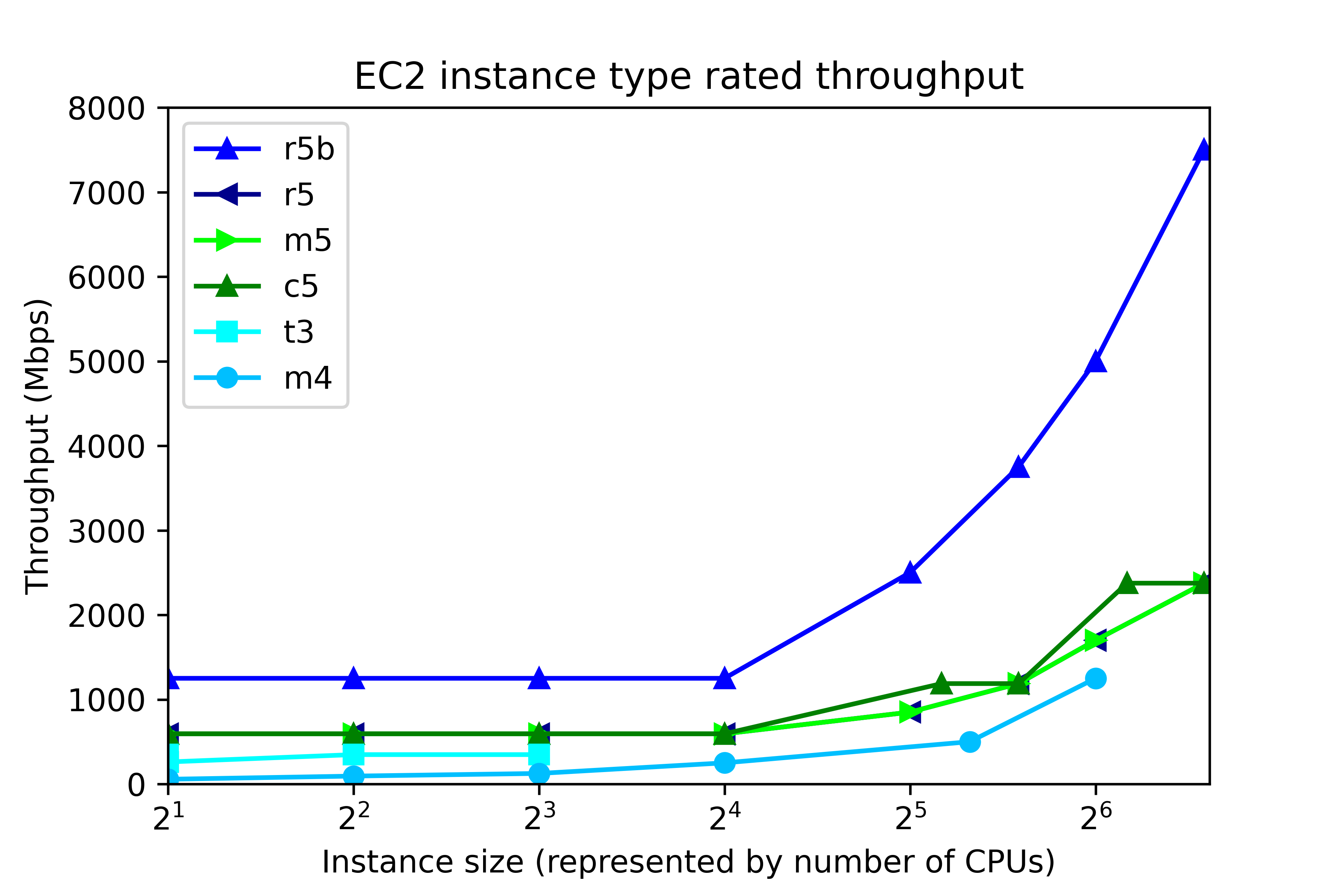
EC2 throughput rating can be found by running “aws ec2 describe-instance-types”, and is divided into two ranges, according to instance size, as shown in the following figure. The number of CPUs in EC2 maps to instance size thus:
| Number of CPUs |
Instance size |
| 2 |
large |
| 4 |
xlarge |
| 8 |
2xlarge |
| 16 |
4xlarge |
| 32 |
8xlarge |
| 48 |
12xlarge |
| 64 |
16xlarge |
| 96 |
24xlarge |
At the low end, up to 4xlarge, throughput is capped at a single value, regardless of instance size. That cap depends on instance class. In r5b, the cap is 1250 Mbps, but for c5, m5, and r5, throughput is capped at 593.75 Mbps. Other instance classes have lower throughput caps. At the high end, 8xlarge and up, throughput depends on the instance size. The r5b instance class tops out at 7500 Mbps. m5, c5, and r5 classes have throughput that ranges from 850 Mbps to 2375 Mbps, depending on instance type.
By now we have described the available volume types and instance types. So let’s pose this question. If we configure 8 gp3 volumes at 1000 Mbps each, then the system should deliver 8000 Mbps throughput, right?
Wrong.
No EC2-EBS-Linux system today delivers 8000 Mbps throughput. You will get, at best, the throughput offered by the EC2 instance type. For example, if you build an m5.4xlarge instance, then the highest possible throughput will be 593.75 Mbps, as I mentioned. Also, 593.75 Mbps is the most you will get. Actually achieving that requires configuring multiple volumes.
Operating system description
The test system is an Amazon AWS EC2 instance running Red Hat Linux 7.9. The test software is orion, which is found in the Oracle home. The number of CPUs, the amount of memory, and the device controller interface depend on the EC2 instance type. For example, the m5.xlarge has 4 CPUs, 16 GB RAM, and a non-volatile memory express (NVMe) device controller interface.
Test description
100% write I/O was tested with orion. General purpose volumes (gp2 and gp3), and the lower cost st1 storage were tested with large writes. I/O optimized storage (io2) was tested at small I/O. Each test ran from 4 to 20 minutes, depending on the number of volumes. For the throughput tests, “Maximum Large MBPS” was extracted from the summary.txt file. In the small I/O tests, “Maximum Small IOPS” and “Minimum Small Latency” were extracted.
Instance type and volume type
In this section, the influence of instance type and volume type in investigated. The new I/O-optimized r5b instance type was tested with gp3 storage. General purpose m5 instance class was tested with gp2, gp3, and io2 storage. Additionally, the lower cost, burstable t3 instance class, and the previous generation m4 instance class were tested. The number of CPUs ranged from 2 to 96. As a rule of thumb, the amount of memory for the m5, t3, and m4 instance classes, in GB, is four times the number of CPU. Eight 125-GB volumes were tested in every run. In all, there were 31 test runs.
Throughput testing
General purpose storage was tested for throughput. gp3 storage was configured for 1000 Mbps throughput per volume (the maximum) and 4000 IOPS The results are displayed here. Each point represents the maximum throughput obtained in a single test. The dark blue line, for example, displays Orion throughput results for 6 tests on r5b.large, r5b.4xlarge, r5b.8xlarge, r5b.12xlarge, r5b.16xlarge, r5b.24xlarge, The test points above 24 are results of separate tests on r5b.4xlarge, m5.4xlarge on gp3 volume type, m5.4xlarge on gp2 volume type, t3.4xlarge, m4.4xlarge, and m5.4xlarge on st1 volume type. Again, each point is a separate test, not Orion data points from a single test.
The figure shows actual system throughput for 8 volumes. We already said that just because you configure 8 1000 Mbps volumes does not mean that the observed throughput will be 8000 Mbps. Instead, the throughput is limited by the instance type.
The key points to notice in the throughput testing are:
- The observed throughput is level across instance types up to 4xlarge (24 CPUs), just like the documentation says.
- Starting at 8xlarge, (25 CPUs), gp3 throughput scales up with the instance size, reaching 7330 Mbps on the r5b.24xlarge instance type, and 2330 Mbps on m5.24xlarge, again, just like the documentation says.
- Like gp3 on the m5, gp2 throughput is level at 580 Mbps for instances up to 4xlarge.
- From 12xlarge and up, gp2 throughput is level at 1015 MPBs.
- For t3.xlarge and up, throughput plateaus at 335 Mbps.
- In older instance class m4, throughput ranges from 55 Mbps to 240 Mbps.
Notice that in high-end instance types, r5b throughput is better than 3x the m5 throughput. This is one example where actual observations match the marketing materials: New – Amazon EC2 R5b Instances Provide 3x Higher EBS Performance
By using the number of CPUs on the horizontal axis, we do not mean to imply that CPUs have a significant influence on system throughput in EC2. In fact, during ORION testing, CPU workload tends be low, and the same can be said for memory footprint. Plotting vs “Number of CPUs” is just meant to be a convenient method for having plotting I/O numbers vs instance size. AWS throttles throughput depending on instance type and size, separately from the number of CPUs.
IOPS testing
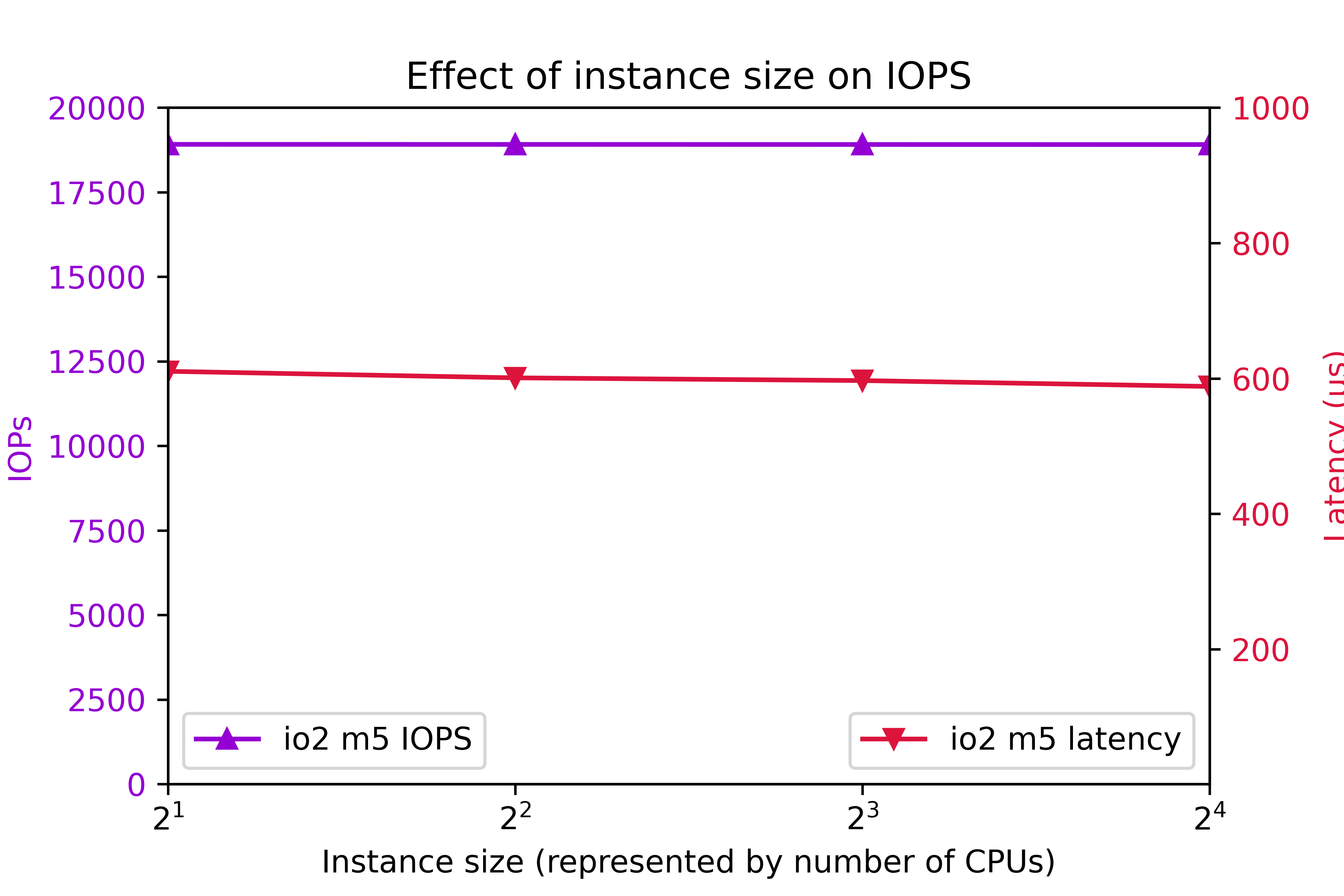
I/O Optimized storage io2 configured for 7000 IOPS per volume on the m5 class was also tested. 8 volumes were tested. Again, to clarify, configured IOPS for each volume was 7000. You might think that configuring 8 volumes are 7000 IOPS per volume should deliver 56000 IOPS. As you can see, actual IOPS is less.
The key IOPS testing observations are:
- IOPs is flat at 18905.
- Latency is flat at 600ms.
Conclusion
- r5b throughput outperforms m5 by better than 3x.
- I/O performance is level up to 4xlarge.
- Starting at 8xlarge, throughput ramps up with instance class.
- 24xlarge delivers the highest throughput.
- t3 write throughput lags m5, and m4 write throughput lags t3.
- The observed system I/O rate is much less than you would expect if you calculated I/O rate based on the volume configuration.
This section was an overview of the capabilities of various EC2 instance types and volume types with eight volumes. As we are about to see, tuning the number of volumes is crucial to optimizing instance performance.
Number of volumes
The influence of the number of volumes on I/O was tested for various instance types. The number of volumes ranged from 1 to 16. Throughput was tested on general purpose volume types gp2 and gp3. The gp3 storage was configured for 1000 Mbps and 4000 IOPs per volume. The results are shown in the following figure: Additionally, IOPS was measured on on I/O optimized volume type io2. IOPS was set at 7000 per volume. The results are shows here:
 The key findings are
- For improved throughput, I/O should be distributed across multiple volumes.
- In r5b.24xlarge, throughput increases all the way out to 7300 Mbps at 16 volumes.
- In r5b8xlarge and m5.24xlarge, throughput levels off around 2400 Mbps at 8 volumes.
- On m5.large, gp2 and gp3 throughput levels off at 580 Mbps at four volumes.
- On m5.large, io2 IOPs plateaus at 18905 IOPs at four volumes.
- io2 latency tends to remain below 625ms.
Be aware that the EC2 device attachment limit is 28, including the network adapter and up to 27 volumes, including the system disk. A practical Oracle ASM system could consist of two diskgroups and four or more disks per group.
In conclusion, one can expect improve I/O by implementing four volumes. In high end systems, configuring eight or more volumes is beneficial. Exercise prudence on the number of volumes, because throughput and IOPS charges are per-volume.
Configured volume throughput
So far, we have tested volumes that are over-provisioned, meaning that measured throughput turned out to be much less than rated throughput. You don’t get what you pay for. So how much throughput should you actually be configuring?
In this section, we investigate the effect of configured throughput versus actual throughput on gp3 volumes. gp3 volumes were configured at 3000 IOPs and a throughput range from 125 Mbps to 1000 Mbps. Various m5 and r5b instance types were tested. The results are shown here. In the m5.large, m5.24xlarge, and r5b.8xlarge cases, setting volume throughput to 375 Mbps achieves the maximum possible system throughput. Setting volume throughput higher than that leads to no further gains in performance. In r5b.12xlarge and r5b.24xlarge, performance can be maximized by setting throughput to 500 Mbps. In conclusion, although gp3 throughput can be adjusted to 1000 Mbps, there is no benefit to setting gp3 throughput above 500 Mbps, and only in rare cases is it beneficial to set gp3 throughput above 375 Mbps.
Intel vs. AMD
AWS offers a choice of Intel or AMD processor on Red Hat EC2. AMD EC2 prices are 10% lower than Intel. Rated EBS throughput on the AMD systems is less than on Intel.
AMD
|
Intel
|
| instance type |
throughput (Mbps) |
instance type |
throughput (Mbps) |
| t3a.medium |
|
t3.medium |
|
| m5a.large |
2880 |
m5.large |
4750 |
| m5a.24xlarge |
13570 |
m5.24xlarge |
19000 |
The test system configurations were:
| Instance type |
CPUs |
Volumes |
Storage |
Throughput |
IOPS |
| t3[a].medium |
2 |
4 |
st1 |
– |
|
| m5[a].large |
2 |
8 |
gp3 |
375 |
3000 |
| m5[a].24xlarge |
96 |
8 |
gp3 |
375 |
3000 |
“t3[a].medium” refers to a comparison of a t3a.medium (AMD) system to a t3.medium (Intel) system, and so on, for m5[a].large and m5[a].24xlarge. At the low end instance types, AMD and Intel performed equally. At the high end, Intel edged AMD.
Systems for different purposes
Recommendations for three different type of systems are presented here. The target system is Oracle Database on top of Grid Infrastructure on Red Hat. Only systems with at least 2 CPUs and 4 GB RAM are considered. A “system” could refer to an ASM diskgroup, such as DATA, RECO, or REDO.
Low cost
You might need a low cost system for light development, well-tuned reports, archiving, etc. Use the t3a instance class and st1 storage.
General purpose
For general purpose production systems, use the m5 class. If you want to halve the memory, substitute c5 and save 9% to 11%. To double the system memory, use r5 and pay 24% to 30% more. Configure four or more gp3 volumes per ASM diskgroup at 125 Mbps to 375 Mbps throughput and 3000 IOPS.
High throughput
For highest large write throughput on EBS, use r5b.24xlarge, and at 16 gp3 volumes configured at 500 Mbps.
Example systems and cost
Example of the three types of system are presented in this table. This time, we present CPU and storage cost, assuming Red Hat Linux and on demand pricing in region us-east-1, as of 7/24/2021.
| Purpose |
Instance Type |
Vol type |
Num CPU |
Vol Size |
Num Vols |
Thr |
IOPS |
Actual Mbps |
EC2 |
EBS |
Total |
| Low cost |
t3a.medium |
st1 |
2 |
125 |
8 |
– |
– |
245 |
$71 |
$45 |
$116 |
| General purpose |
m5.large |
gp3 |
2 |
250 |
4 |
125 |
3000 |
497 |
$114 |
$80 |
$194 |
| High throughput |
r5b.24xlarge |
gp3 |
96 |
1000 |
16 |
500 |
3000 |
7330 |
$5316 |
$1522 |
$6838 |
Do not waste money
Follow this guidance to avoid wasting money
- Avoid io2 EBS for general purpose Oracle databases. The cost is prohibitive.
- In gp3, configure throughput at 500 Mbps or less, and configure 3000 IOPS.
- For good, economical performance, configure gp3 at 125 Mbps and 3000 IOPS.
Workload
This article offers guidance on configuring the AWS EBS at 100% write. The findings apply to any diskgroup, particularly to redo diskgroups and to databases with high throughput requirements, such as ETL systems. The information is among many factors to consider when specifying a practical database system. Orion is also capable of simulating a 100% read workload, and a mixed workload. Mixed workload Orion results could be used to look for further cost reductions. Actual database application performance depends not only on storage throughput, but also on processor design, amount and speed of memory, and table design.
ASM diskgroup layout
Oracle makes ASM diskgroup layout recommendations: RAC and Oracle Clusterware Best Practices and Starter Kit (Platform Independent) (Doc ID 810394.1).
Oracle recommends a minimum 4 disks per diskgroup: My own test results show that a minimum of 4 LUNs per diskgroup lead to optimal throughput. Configuring 4 or more LUNs per diskgroup is extremely important.
Oracle recommends no more than 2 ASM diskgroups: Benefits of no more than 2 ASM diskgroups:
- Simplified administration.
- High throughput in all diskgroups.
- Avoid approaching the EC2 attachment limit.
If you configure more than 2 diskgroups, you could find yourself making design compromises at exactly the wrong places. For example, online redo logs are critical, high throughput components. If you configure separate REDO diskgroups in EC2, then you may find it difficult to keep to 4 disks per diskgroup, and still allow for expansion and remain within the attachment limit. Or you may find that so many diskgroups leads to a manageability issue.
Conclusion
The r5b instance class with gp3 storage delivers the highest performing I/O. m5, c5, and r5 instance classes make well-performing, general purpose systems with high throughput. The t3a instance class with st1 storage makes a fair-performing, low cost system. Each ASM disk groups should be configured with a minimum of 4 disks and more than 4 disks for high throughput r5b systems. For optimal throughput, gp3 EBS should be configured at 3000 IOPS and no more than 500 Mbps.